
Enable and Configure 3D Secure for Your Gateway
Last updated on Aug 26, 2026
Most gateways require you to take some action on their side to enable 3D Secure. This is the first step in testing and implementing 3D Secure: enable 3DS at your gateway, configure your Advanced Billing test site with test credentials, and use each gateway's test cards to simulate 3DS flows.
Please be aware that this article is related to testing and implementing 3D Secure. We currently support 3DS on the following gateways: Stripe, Braintree, CyberSource, Windcave (Payment Express), Adyen.
Enabling 3DS at your gateway
| Gateway | What to Do |
|---|---|
| Stripe | 3DS is already enabled in Stripe by default. |
| Braintree | Contact Braintree to ensure 3DS is enabled on your account. See Braintree's 3D Secure documentation for more information. |
| CyberSource | Contact CyberSource to enable 3D Secure on your account and retrieve Cardinal Commerce credentials. |
| Windcave (formerly Payment Express) | Contact Windcave support and request a set of REST API credentials (REST API Username and REST API Key) linked to your existing PxPost credentials under the same "Group Account." This linkage under the same Group Account is important for correct functionality with Advanced Billing. Also have Windcave enable AJAX_POST and FORM_POST for your account. Windcave credential types differ depending on whether the Advanced Billing site is used for testing or production: test sites use UAT credentials, and live sites use SEC credentials. Windcave itself also has separate usernames and passwords for its test and live environments. |
| Adyen | 3DS is already enabled in Adyen by default. |
| BlueSnap | Visit BlueSnap Account > Settings > Fraud Settings and enable 3D Secure.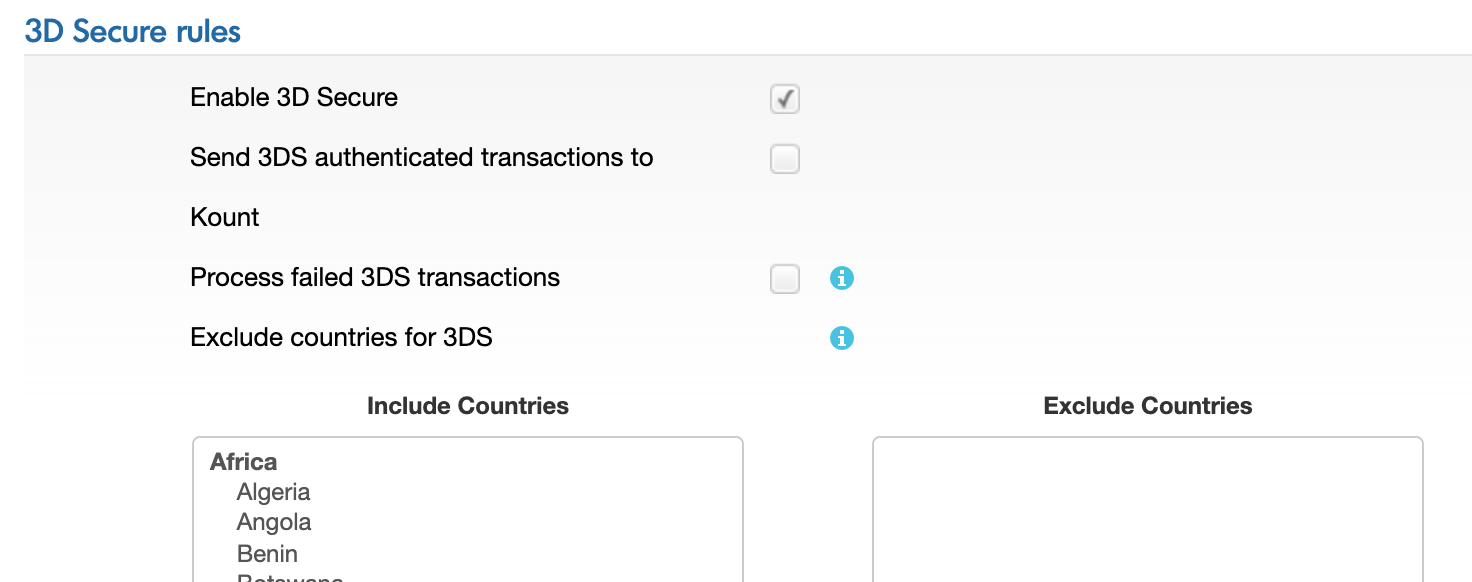 3D Secure rules for BlueSnap account |
Configuring an Advanced Billing test site with test gateway credentials
If you haven't created an Advanced Billing test site yet, it is recommended to create one in order to test the 3DS flow; see Test Site Basics. When configuring your gateway on the test site, you may have to provide additional information to enable 3DS support.
| Gateway | What to Do |
|---|---|
| Stripe | No additional steps are needed for Stripe. |
| Braintree | Visit Config > Payment Gateways and edit your Braintree credentials. At the bottom of the popup is a checkbox labeled Strong Customer Authentication (SCA) Enabled.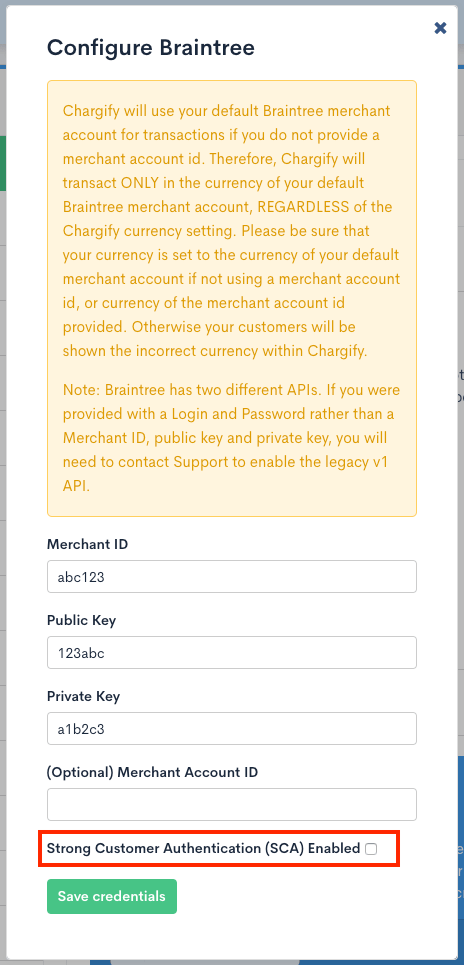 Enable SCA requests for Braintree in Advanced Billing |
| CyberSource | CyberSource requires two additional steps, both completed on the same page in Advanced Billing. From Config > Payment Gateways, edit your existing credentials and perform the following:
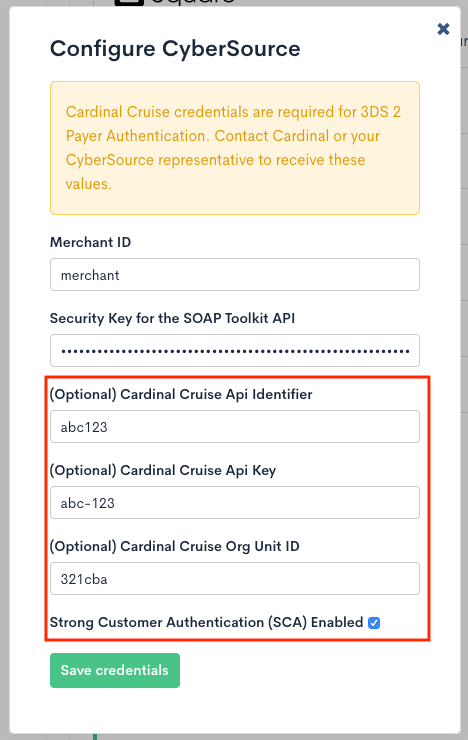 Enable SCA requests for CyberSource in Advanced Billing |
| Windcave (formerly Payment Express) | Windcave requires two additional steps, both completed on the same page in Advanced Billing. From Config > Payment Gateways, edit your existing credentials and perform the following:
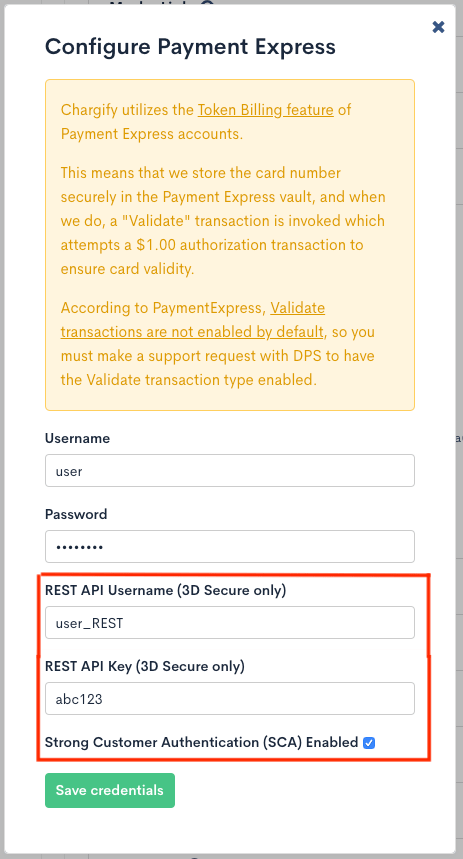 Enable SCA requests for Windcave in Advanced Billing |
| Adyen | Visit Config > Payment Gateways and edit your Adyen credentials. At the bottom of the popup is a checkbox labeled Strong Customer Authentication (SCA) Enabled, and an SCA Live Environment dropdown where you can select the environment closest to your location:
|
| BlueSnap | Visit Config > Payment Gateways and edit your BlueSnap credentials. At the bottom of the popup is a checkbox labeled Strong Customer Authentication (SCA) Enabled. |
Gateway test cards
Most gateways provide unique test card numbers you can use to simulate successful and unsuccessful 3DS flows.
| Gateway | Test Cards |
|---|---|
| Stripe | 4000000000003063See Stripe's documentation for more information. |
| Braintree | See Braintree's documentation for test cards. |
| CyberSource | Successful cards:
|
| Windcave (formerly Payment Express) | See Windcave's documentation for details. Use any future card expiration date and any 3-digit CSC/CVC value for successful and unsuccessful payments. Successful cards:
|
| Adyen |
|
| BlueSnap | Successful without challenge:
Security code (CVV): any 3-digit code. Challenge: the username test1 is prefilled, and the password is 1234.See BlueSnap's documentation for more information. |
Still need help?
Reach out and our support team will take it from here.