
Understand the Gateway Change Process
Last updated on Sep 19, 2026
A gateway change lets you update the payment gateway your existing Advanced Billing site is connected to without requiring your customers to re-enter their credit card information. There are also situations where a merchant is migrating to Advanced Billing from a legacy system and changing payment gateways at the same time. Either way, a coordinated gateway change gives your customers a seamless transition.
Advanced Billing does not store full credit card numbers:
- Your third-party payment gateway stores this information.
- When a customer enters their credit card information at signup, or updates the existing credit card on file, Advanced Billing sends the full credit card information to the payment gateway, which stores the data and sends back a "vault token."
- Advanced Billing stores vault tokens and uses them to link the customer in Advanced Billing to the card data associated with that customer in your payment gateway.
When you change payment gateways, the credit card information stored in your beginning gateway isn't stored in your ending gateway. To change gateways without requiring your customers to re-enter their credit card information, you need to ensure your beginning gateway can export credit card data and your ending gateway can import that data to generate new vault tokens. You then provide the new vault tokens to Advanced Billing so we can update our database while updating the gateway credentials and forcing the gateway change.
If your beginning gateway does not support data portability and is unable to export the stored credit card information, you need to ask your customers to re-enter their credit cards when you switch to a new payment gateway.
Requirements
Before requesting a gateway change, make sure you meet the following requirements:
- Advanced Billing requires a 1-month notice to schedule a gateway change.
- Your beginning gateway must support data portability (the ability to export your customers' credit card data). If you're unsure, contact your beginning gateway to verify.
- Your ending gateway must support data imports, either by receiving the file from the beginning gateway or through their API. If you're unsure, contact your ending gateway to verify. If your ending gateway imports the file from your beginning gateway, they must also send Advanced Billing a mapping file that links each customer's old vault token to the new vault token generated during import.
- Coordinate a data export with your beginning gateway, and provide Advanced Billing with the scheduled date of this export.
- The site must be using the Multi-Gateway feature. Once a gateway change is requested, this feature is turned on for your site.
WARNING: Do not export from the beginning gateway until the Advanced Billing site has been pointed to the ending gateway. Credit card data for all new signups will be left behind.
Before the change, coordinate the following with Advanced Billing:
- Coordinate with your ending gateway, and provide us with an estimated delivery date for when your ending gateway can send Advanced Billing the token mapping file.
- Provide the contact information (email addresses) for the contacts at your beginning gateway and your ending gateway.
- Provide the name of your Advanced Billing subdomain(s) where the gateway change takes place.
- Verify your ending gateway credentials are working properly in Advanced Billing.
The merchant must then take the following steps:
- Add the ending gateway and connect it by entering your credentials.
- Perform a test signup in the Admin UI using a real credit card to ensure new signups process successfully through your ending gateway.
- Make the ending gateway the default for the payment types that are being moved.
It is the merchant's responsibility to ensure ending gateway credentials are correct and the new payment gateway is working as expected.
Scenario A: the ending gateway receives the file from the beginning gateway
The vast majority of gateway changes for existing Advanced Billing merchants fit into this category.
Your beginning gateway can export your customers' credit card data, and your ending gateway can receive the file, perform the import, and tokenize the cards.
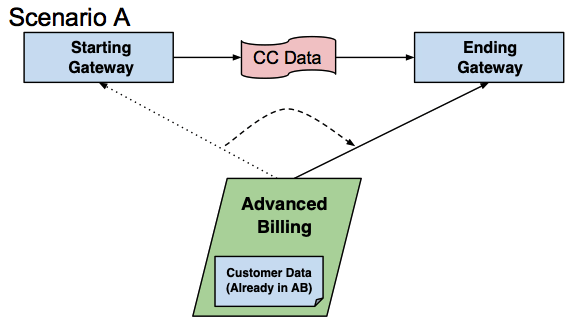
- You configure the ending gateway as the default gateway for the payment types being moved.
- Signups and updates using Advanced Billing-hosted pages flow into the default gateway.
- Renewals continue processing in the beginning gateway. If you don't want this to happen, notify support.
- Your beginning gateway should perform an export and deliver the file to the ending gateway.
- The ending gateway imports the credit card data and delivers a mapping file to Advanced Billing, mapping the beginning gateway tokens to the ending gateway tokens.
- Advanced Billing briefly delays renewals and performs a "token swap," replacing the beginning gateway tokens with the ending gateway tokens.
Cost for scenario A
Free of charge.
Scenario B: the ending gateway requires import through the API
In some cases, the beginning gateway can provide an export of your customers' credit card data, but your ending gateway doesn't support receiving the file and performing the import on your behalf.
Because full credit card numbers should only be handled by Level 1 PCI-compliant entities, it's best to send the file directly to Advanced Billing so we can perform the API import on your behalf.
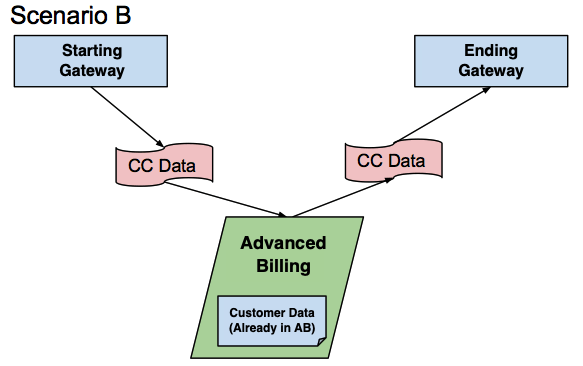
- You configure the ending gateway as the default gateway for the payment types being moved.
- Signups and updates using Advanced Billing-hosted pages flow into the default gateway.
- Renewals continue processing in the beginning gateway. If you don't want this to happen, notify support.
- The beginning gateway performs the export and sends the secure file to Advanced Billing directly.
- Advanced Billing formats the information and performs the import to tokenize the credit cards at the ending gateway.
- Advanced Billing briefly delays renewals and performs a "token swap," replacing the beginning gateway tokens with the ending gateway tokens.
Cost for scenario B
Advanced Billing imports the credit card data using the file received by the beginning gateway. The import and any required formatting is charged at a rate of $250/hr.
Scenario C: migrating from a legacy system, ending gateway requires import through the API
If you're migrating to Advanced Billing from another legacy system, see Migrate to Advanced Billing before continuing.
If the ending gateway doesn't support receiving the file from the beginning gateway and performing the import on your behalf, the file needs to be sent directly to Advanced Billing. Advanced Billing then completes a full import of card data along with customers and subscriptions.
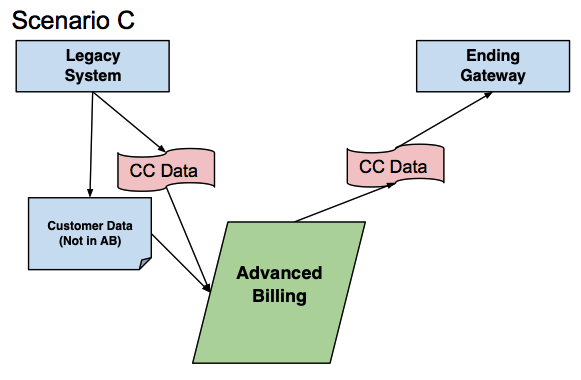
- The beginning gateway performs the export and sends the secure file to Advanced Billing directly.
- The merchant needs to export their customer and subscription data from their current system and format it in the required Advanced Billing CSV import format. Provide the completed file to Advanced Billing before the card data is received from the beginning gateway.
- Advanced Billing runs a script to merge the CSV import file provided by the merchant with the file provided by the beginning gateway containing the full credit card numbers of each customer.
- Advanced Billing performs the CSV import or API import if you require component allocations at the time of import.
- Advanced Billing notes any errors or issues during import and works with the merchant to resolve them, if possible.
Cost for scenario C
CSV import: $150/hr for merging the beginning gateway file with the CSV import file provided by the merchant and reformatting it, plus $150/hr for the actual CSV import once the file is formatted properly.
API import: $250/hour for the entire process.
Scenario D: migrating from a legacy system, ending gateway receives the file from the beginning gateway
If your ending gateway supports receiving the card data file from the beginning gateway and performing the import on your behalf to tokenize the credit cards, you can import your customers, subscribers, and new vault tokens into Advanced Billing using the CSV import or API import. Advanced Billing does not need to be notified in this scenario.
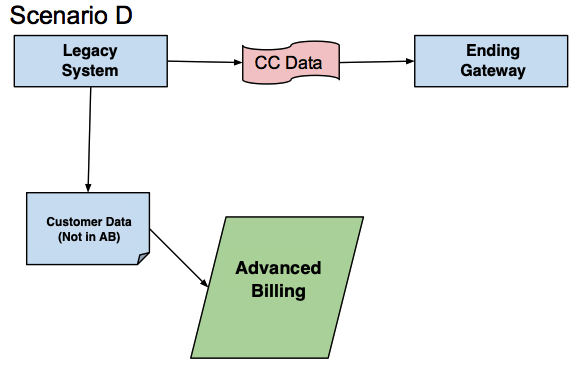
- The beginning gateway performs the credit card data export and sends the secure file to the ending gateway.
- The ending gateway imports the credit card data and tokenizes the cards.
- The merchant needs to export subscription data from their current system, as well as the vault tokens in the ending gateway, and format it in the required Advanced Billing CSV import or API import format.
- The merchant performs the import.
Cost for scenario D
Self-service import: Free of charge.
If you require Advanced Billing's assistance, this is a paid service. Review the CSV import assistance or Developer Assistance pricing for API imports.
Scenario E: migration over time as cards expire and are updated
If you want to direct all new signups and updates to a new gateway, configure the new gateway as the default gateway for the relevant payment types. Renewals still work, but the next time a customer updates their payment method, the update essentially adds a new payment method in the new default gateway. Keep in mind that if you're using Maxio.js for card updates and you specify a gateway handle, you also need to change it to the new gateway. This way, you can slowly migrate to a new gateway without involving the gateways in exporting and importing payment details, which may be useful if your beginning gateway can't export the payment details.
Cost for scenario E
Free of charge.
Available dates, communication, timelines, and deadlines
Keep the following dates, communication, and timeline details in mind:
- The scheduled date must be a business day, Monday through Thursday. Advanced Billing does not perform gateway changes on Fridays, weekends, or holidays.
- Once the date is scheduled, Advanced Billing delays your subscription renewals on the scheduled date.
- If you need to cancel, notify us immediately.
- If you need to reschedule, the new date is subject to the required 1-month notice.
Based on the information you provide, Advanced Billing provides a schedule outlining the estimated completion date of each step of your gateway change, and communicates with you at each step in the designated support ticket.
Before beginning the gateway change process, we establish a deadline for when we need to receive the mapping file from your ending gateway. This deadline is set to one week after we originally delay your renewals, and we provide you with the specific date and time so you know when to expect your renewals to resume.
If there's a delay on the payment gateway side (for example, the token mapping file isn't sent to Advanced Billing by the expected date), the deadline is missed. If necessary, Advanced Billing pushes out your renewals another week to ensure you don't experience any failed renewals. Any scheduled steps that haven't happened yet are pushed out in parallel.
No other changes are permitted once the process has begun.
Submitting your request
To get started, submit a gateway change request by emailing support@maxio.com or submitting a request while logged into the application to indicate you wish to change your gateway.
Include the following information:
- Indicate which gateway change scenario is applicable (A, B, or C). You don't need to notify Advanced Billing for scenario D unless you require paid import assistance.
- Name of beginning gateway.
- Name of ending gateway.
- Scheduled date of your beginning gateway data export. This must be at least one month ahead of the date you submit your request.
- The name of your Advanced Billing subdomain(s) where the change takes place.
- A link to the payment where you've successfully verified your ending gateway credentials.
Once we receive your request, we reply with additional details, instructions, and a timeline tailored to your specific needs.
Handling refunds when changing gateways
As long as your beginning gateway account is still functioning, you may be able to process refunds through Advanced Billing for transactions created prior to the gateway change. This depends on your relationship with that gateway and how funds are managed with them.
If you still have access to a web portal for your beginning gateway, you may be able to process the refund there. Or, once the cards have been imported to the ending gateway, you may be able to process an "unlinked refund" to the customer's card. Otherwise, you may need to send the customer a check or use another manual method of returning the funds. If funds are returned to the customer, record an external refund in Advanced Billing so the subscription details are correct.
Still need help?
Reach out and our support team will take it from here.