
View Consolidated Invoice Links on Individual Invoices
Last updated on Aug 20, 2026
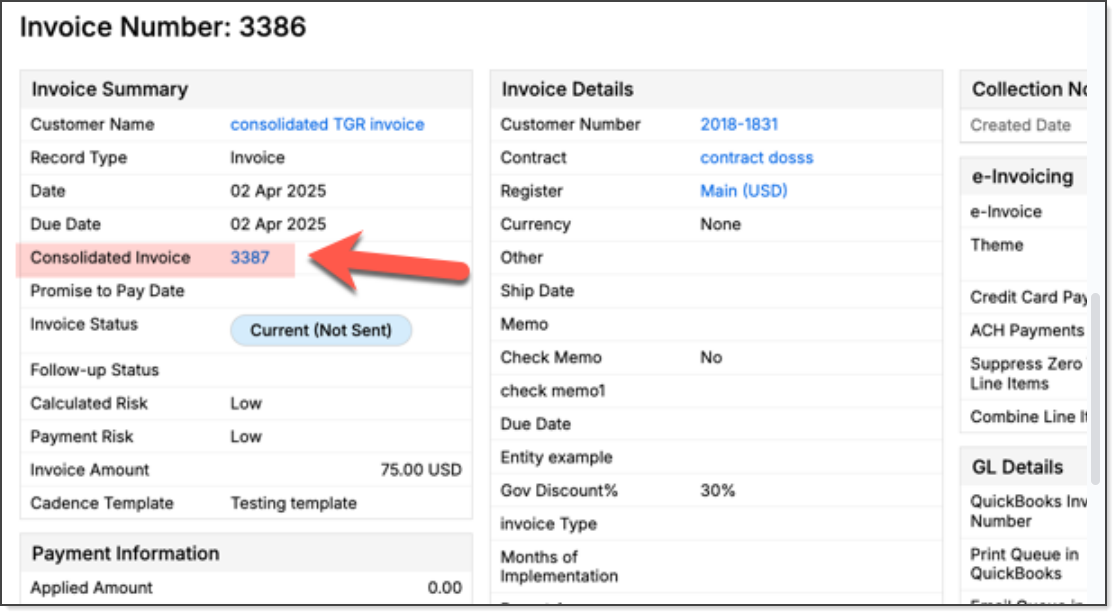
The Consolidated Invoice field on an Invoice shows which consolidated invoice it's included in, with a clickable link that takes you directly there instead of searching manually.
Example: In the Invoice below, the Consolidated Invoice field displays invoice 3387 as a hyperlink. Clicking the link takes you directly to the consolidated invoice.
Accessing the Consolidated Invoice
When an individual Invoice is included in a consolidated invoice, its record displays a Consolidated Invoice field that:
-
Shows the consolidated invoice that includes it.
-
Provides a clickable link for direct access to that consolidated invoice.
-
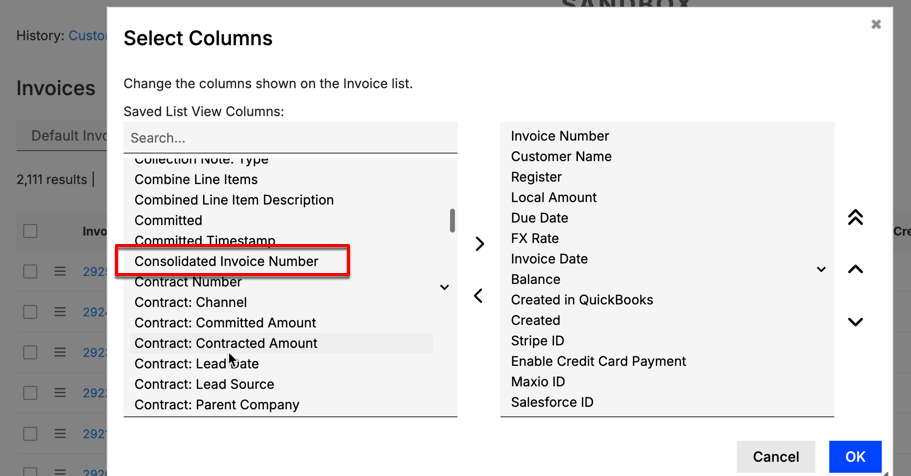
Can be added as a column named Consolidated Invoice Number in the Invoice List and Invoice Line Item List views, for easier sorting, filtering, and export.
Related information
For more information on combining Invoices, see Consolidate Multiple Invoices into One.
Still need help?
Reach out and our support team will take it from here.