
Understand Mid-Term Contract Changes
Last updated on Aug 26, 2026
The Mid-Term Contract Change tool (for Advanced Contract Changes) allows multi-edit adjustments. It's ideal for upgrades, downgrades, pauses, or combined changes in amount, date, and item. You can choose automatic or manual closure of original Transactions, with system-calculated or user-defined final amounts. This ensures flexibility for renegotiations or rate adjustments mid-subscription.
Common use cases:
- Your Customer upgrades or downgrades in the middle of a subscription
- You need to process a temporary pause in services to a Customer
- Your Customer renegotiates the original Contract amount and dates
- Any other combination of simple edits (amount + dates + items)
How it works
Any time you initiate a mid-term Contract change you'll be prompted to perform the following actions:
- Close the original Transaction(s), which you can do automatically or manually
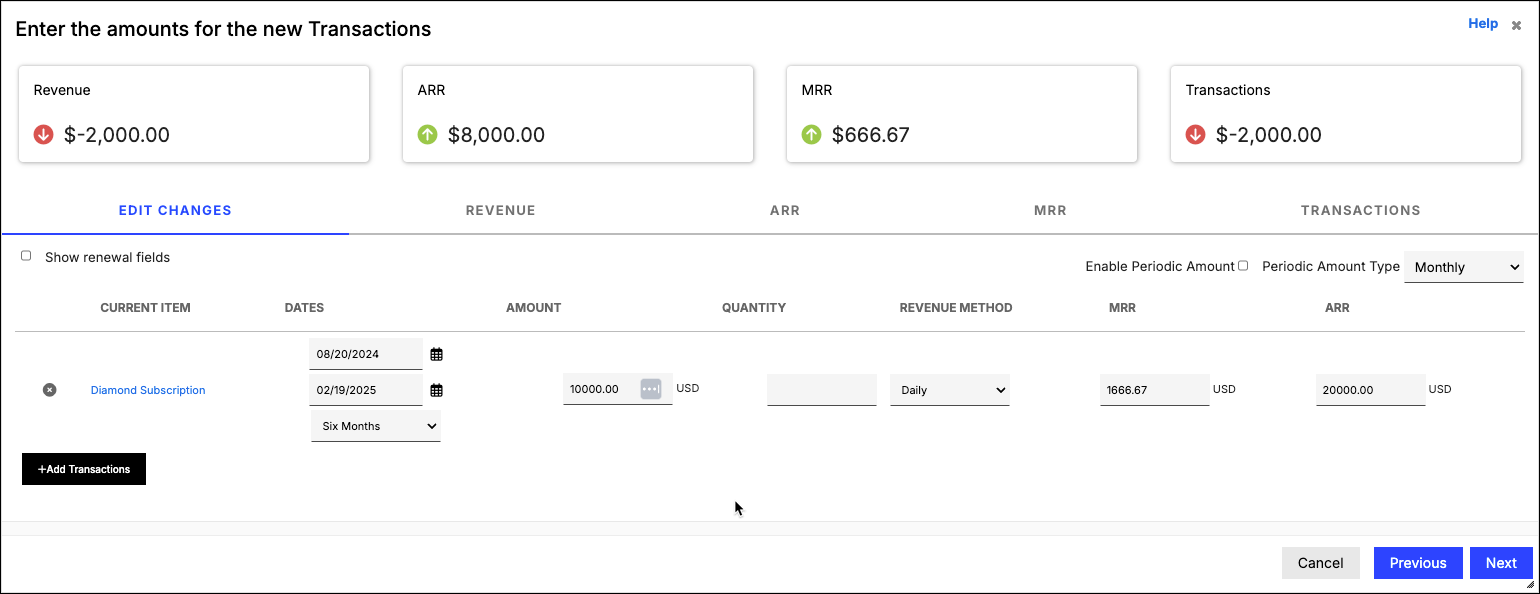
- Enter new Transaction(s) according to your specifications
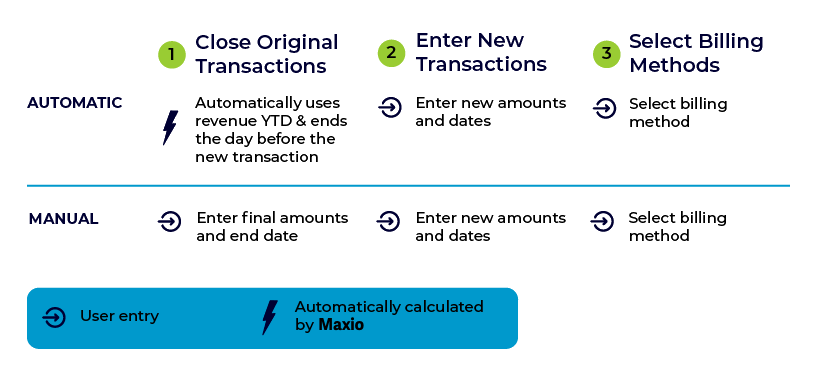
Closing the original Transactions involves performing two main actions to the original Transactions:
- Setting a revised end date
- Setting a final amount to recognize and bill
Automatically closing the original Transaction
If you choose this method, we'll automatically calculate the end dates and amount to recognize for the original Transactions. The calculations are performed as follows:
| Action | How it's calculated |
|---|---|
| Setting the revised end date | Day prior to the start date of new Transaction(s) |
| Setting the final amount | Revenue to revised end date |
Why you would Automatically close the original Transactions:
- There's no specific final amount to use when closing the original Transactions
- You just have a new rate to use going forward
- The final amount you want to use is the revenue recognized to the date of change
Automatic Example:
A Customer signs a one-year agreement for $12,000 ($1,000 / month) for their Basic Subscription. Six months into the agreement, the Customer upgrades to the Premium Subscription ($2,000 / month) for the remaining six months.
| Original TX | Adjustment TX | New TX | |
|---|---|---|---|
| Amounts | $12,000 | -$6,000 | $12,000 |
| Dates | 7/1/20 to 6/30/21 | 1/1/21 to 6/30/21 | 1/1/21 to 6/30/21 |
| Items | Basic | Basic | Premium |
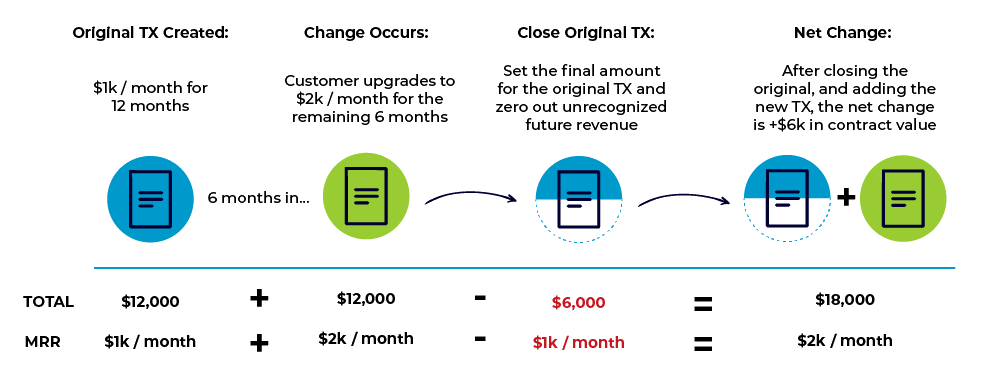
Manually closing the original Transaction
If you choose this method, you'll have the ability to manually enter the final end dates and amounts to recognize for the original Transactions. The calculations are performed as follows:
| Action | How it's calculated |
|---|---|
| Setting the revised end date | Manual entry |
| Setting the final amount | Manual entry |
Why you would Manually close the original Transactions:
- You have a specific amount to recognize for the original Transactions (For example, before starting the new rate, your Customer agrees to pay-off the original Contract amounts for a specific amount).
Manual Example:
Using the same example above in the automatic calculation, but with the following change:
- The billing schedule to date is quarterly, and Customer has only paid the first $3,000 invoice. The company agrees to let them out of paying the outstanding $3,000 in exchange for upgrading to the new rate.
| Original TX | Adjustment TX | New TX | |
|---|---|---|---|
| Amounts | $12,000 | -$9,000 | $12,000 |
| Dates | 7/1/20 to 6/30/21 | 1/1/21 to 6/30/21 | 1/1/21 to 6/30/21 |
| Items | Basic | Basic | Premium |
Still need help?
Reach out and our support team will take it from here.