
Configure Invoice Email Delivery
Last updated on Aug 25, 2026
Control how and when your Customers receive Invoices by email, for both automatic and manual payment types, including rules for $0 Invoices, PDF attachments, and template content. You can find these settings by going to Config > Settings > Invoices in Advanced Billing.
Invoice emails for payments
Automatic and manual payment types each have their own email toggle and template, alongside shared options for $0 Invoices, template customization, and PDF attachments.
For automatic payments
Enable this setting to automatically email an Invoice to Customers when it's issued for a Subscription using automatic payment collection.
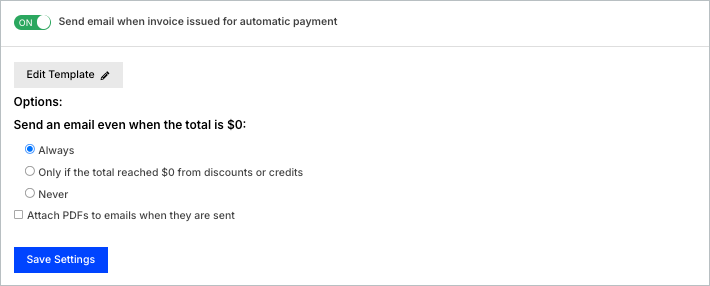
- On: Invoices are generated and sent via email.
- Off: Invoices are generated but not sent.
For manual (remittance) payments
Enable this setting to send Invoices to Customers who are expected to pay manually (remittance).
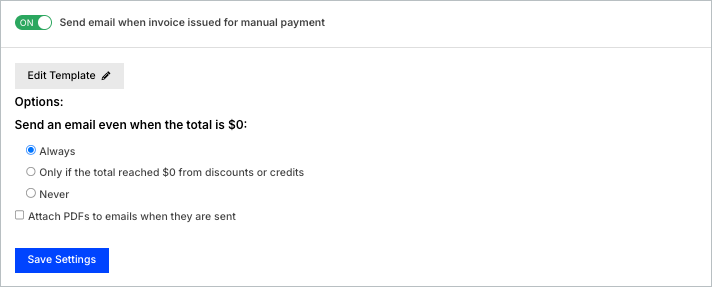
- On: Invoices are generated and sent via email.
- Off: Invoices are generated but not sent.
Customizing email templates
Click Edit Template to customize the email content sent with your Invoices. You can insert variables such as Customer name, Subscription details, and Invoice totals. For a complete list of supported variables, see the Email Templates article.
Delivery options for $0 invoices
When Invoice emails are enabled, you can configure how emails are handled when the Invoice total is $0:
- Always: Send email even if the total is $0.
- Only if the total reached $0 from discounts or credits: Email is sent only when the original subtotal was positive but reduced to $0 due to discounts or credits.
- Never: Do not send emails for $0 Invoices.
Attach PDF copies of invoices
You can choose to attach a PDF version of the Invoice to the outgoing email by enabling the Attach PDFs to emails when they are sent option.
Emails with multiple invoices for a subscription
If multiple Invoices are issued for a Subscription, Advanced Billing groups them into a single email. You can choose to customize the email content as well as include attached PDFs.
Related information
For general Invoice settings, including collection methods and numbering, see Manage Invoices Settings.
Still need help?
Reach out and our support team will take it from here.