
Set the Expiration Time for Public Invoice Links
Last updated on Aug 25, 2026
Control how long your public invoice links remain accessible by setting an expiration time. This helps protect sensitive billing data and limits how long external users can view an Invoice. Using public invoice link expiration reduces risk and improves financial data control.
Only users assigned the Owner or Admin role can view or edit public invoice link expiration settings.
Why set an expiration time?
Public invoice links make it easy to share billing details externally, but they can also expose confidential information if left active indefinitely. Setting an expiration window allows you to:
- Protect invoice data by limiting how long links can be used.
- Prevent unauthorized access to outdated or shared links.
Example use cases:
- An Admin wants to limit how long Customers can access a public invoice link for security reasons.
- An Owner needs to update expiration settings to comply with company policy.
Configure the expiration time
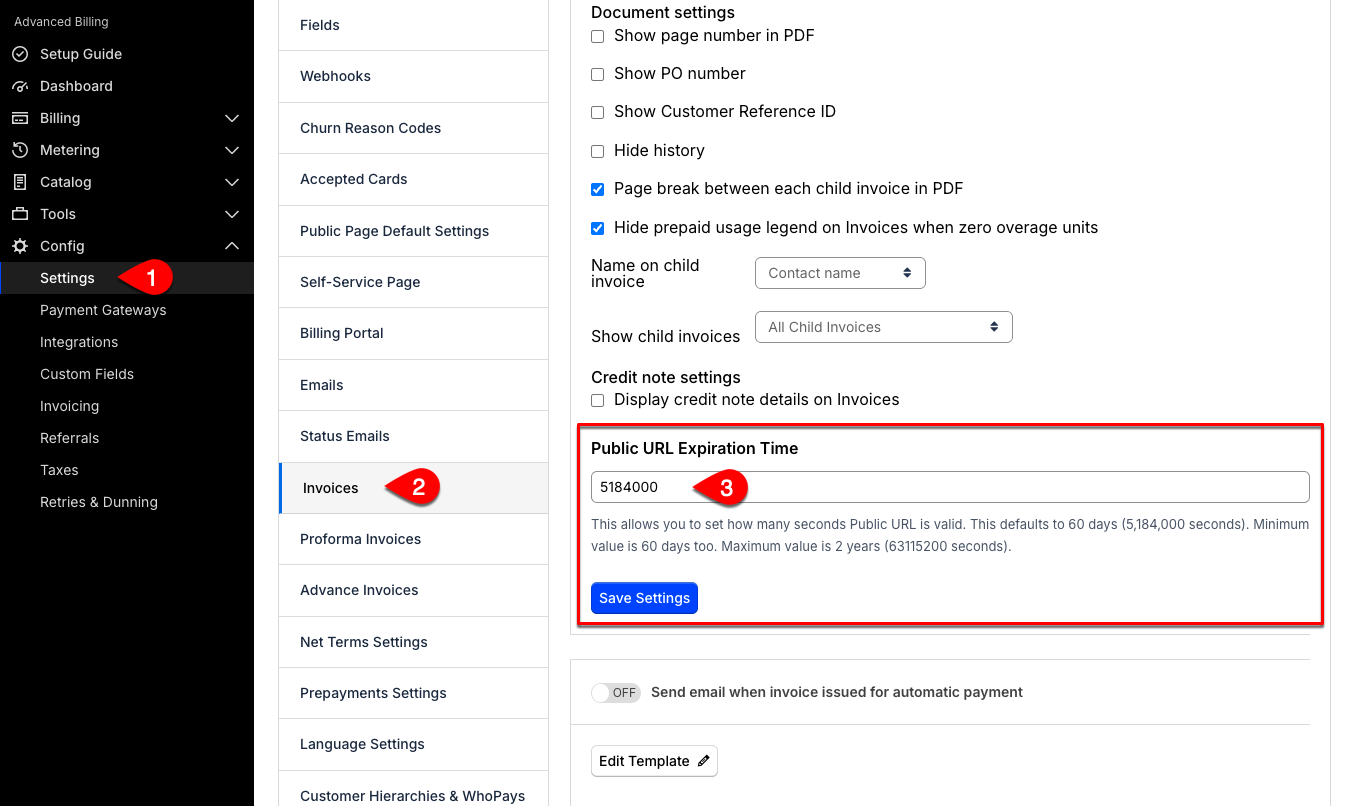
You can configure how many seconds a public invoice link remains valid. By default, the expiration is set to 60 days (5,184,000 seconds). The minimum allowed value is also 60 days. The maximum allowed value is two years (63,115,200 seconds).
Changing this setting only affects new public Invoice links created after the change. Links already shared with a Customer keep the expiration they were issued with.
Only Admins and Owners can set or change the expiration time for public invoice links.
To set or update invoice link expiration
- Log in as an Admin or Owner.
- From Advanced Billing, go to Config > Settings, then click Invoices.
- Scroll down to the Public URL Expiration Time field.
- Enter the number of seconds to set your preferred expiration time.
- Save your setting.
Related information
For general Invoice settings, including collection methods and numbering, see Manage Invoices Settings.
To view and share an Invoice's public URL, see View and Share Invoice Public URLs.
Still need help?
Reach out and our support team will take it from here.