
Review Meter Results in Billing
Last updated on Aug 28, 2026
Check a Subscription's current usage, or test billing before the period renews, to confirm Meter results and Product pricing are working as expected.
View usage on a Subscription
To see current usage for a Subscription:
- From Advanced Billing, go to Billing > Subscriptions and open the Subscription.
- Click the Components tab.
- Find the metered Product.
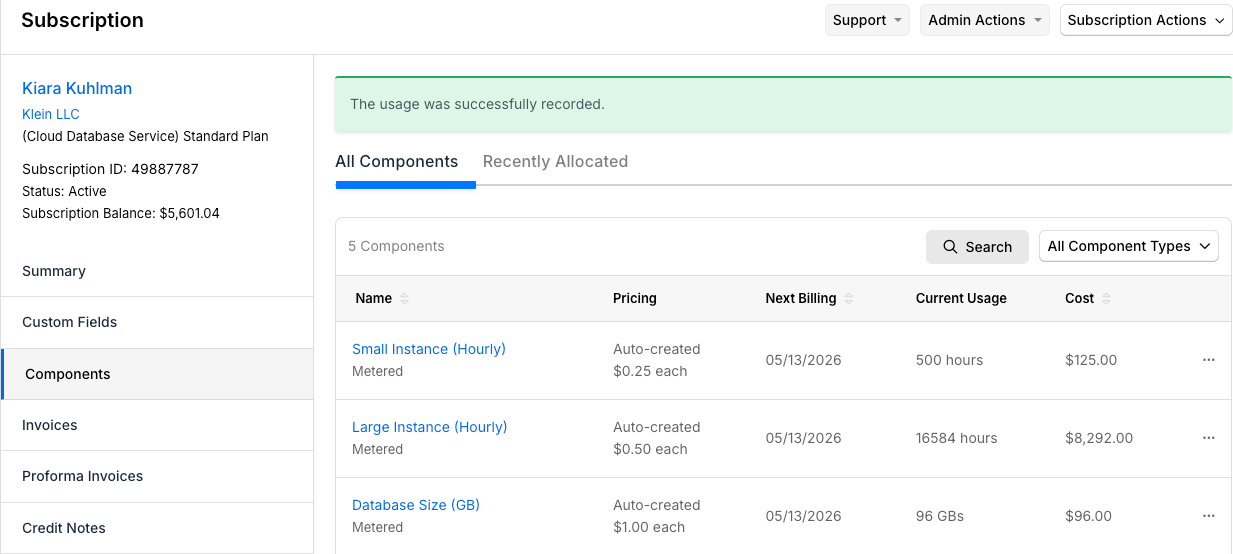
The quantity displayed reflects all events processed so far in the current billing period.
Test billing before renewal
Preview usage-based charges before the billing period ends to confirm that Meter results and Product pricing are working as expected.
To test billing before renewal, use one of the following options:
- Generate a Proforma Invoice from the Subscription.
- Configure the metered Product with a short billing interval, such as 1 day, during testing.
After testing, confirm that the Invoice quantity, Segment values, and pricing match your expected usage-based charge.
Related information
To understand how Meter results reach an invoice, see Understand Meter Results in Billing.
Still need help?
Reach out and our support team will take it from here.