
View Revenue and Invoice Totals
Last updated on Aug 31, 2026
Revenue and Invoice totals provide a quick financial summary for Customers, Contracts, and Transactions in Maxio Core. This article explains how totals are calculated, how deferred revenue and unbilled AR are derived, and how to reconcile differences between revenue and invoice reporting.
The Customer, Contract, and Transaction screens each include Invoice and Revenue totals in the Financial Summary table, though they do not all show the same fields.
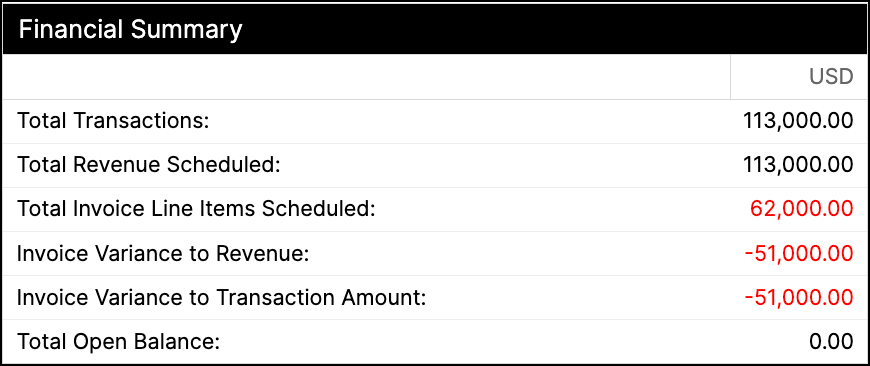
Important concepts:
- Revenues exist only for Transactions.
- A Transaction can have no revenues.
- A Transaction can have revenues while its Recognize - Include in Finance Reports setting is deselected, which excludes those revenues from financial reporting and from several of the revenue totals on these screens.
- Certain revenue calculations on the screen are as of month-end.
- Deferred Revenue is calculated using both the recognizable revenues and the invoice line items.
- Revenues for Transactions with Recognize deselected are not included in deferred revenue calculations.
- Unbilled AR occurs when the recognizable revenue at a point in time exceeds the total invoiced at that point in time. It is common, and often goes unnoticed; how data is organized can also cause it.
Which totals appear where
The Customer and Contract screens show the same four totals. The Transaction screen shows a different, larger set. Field names differ between them, so check which screen you are on before matching a figure to a definition here.
| Total | Customer | Contract | Transaction |
|---|---|---|---|
| Total Transactions | yes | yes | no |
| Total Revenue Scheduled | yes | yes | yes |
| Total Invoice Line Items Scheduled | yes | yes | no |
| Total Invoices Scheduled | no | no | yes |
| Total Open Balance | yes | yes | no |
| Recognized Scheduled Revenue | no | no | yes |
| Unrecognized Scheduled Revenue Balance | no | no | yes |
| Invoiced | no | no | yes |
| Deferred Revenue | no | no | yes |
| Unbilled AR | no | no | yes |
Customer and contract screens
Total Transactions
The sum of all Transaction Amounts.
Total Revenue Scheduled
The total of all Revenue for all Transactions. The Transaction Recognize setting has NO impact on this calculation.
Total Invoice Line Items Scheduled
The total of the Invoice Line Item Amounts for all Invoice Line Items that belong to the object, regardless of sync state or status.
Not all components of an Invoice have revenue implications in Maxio Core — sales and VAT taxes and non-syncing Products or Items are two such components. That is why this total sums the Invoice Line Items rather than the Invoices.
Total Open Balance
The unpaid remainder across the object's Invoices.
Transaction screen
Recognized Scheduled Revenue
The total of recognizable Transaction Revenue through a point in time, always as of the end of the month.
Unrecognized Scheduled Revenue Balance
The total of all Revenue scheduled after the end of this month, plus any revenue for Transactions with Recognize deselected.
Invoiced
The total of the Invoice Line Item Amounts for all Invoice Line Items on an Invoice dated on or before the end of the month, regardless of sync state or status.
Total Invoices Scheduled
The Transaction screen's equivalent of Total Invoice Line Items Scheduled. Despite the name, it sums the Invoice Line Items belonging to the Transaction, not whole Invoices.
Deferred revenue and unbilled AR
Both are shown here as a convenience. Technically each is only calculated at the Contract level, so treat the Transaction-level figures as indicative.
Still need help?
Reach out and our support team will take it from here.