
Configure Clearbit for Segmented Reporting
Last updated on Aug 26, 2026
Producing analytical reports with up-to-date segmentation data can be difficult to maintain. Pulling from multiple sources and manually updating customer-level information can be challenging. But, having those insights is invaluable. Enable the integration, map fields, ensure Domain is set, and use Clearbit data as filters and cohorts in Analytics and Cohort reports; nightly sync keeps values current.
The Clearbit integration is free. There is no additional cost to your Maxio Platform subscription whatsoever. Furthermore, no subscription with Clearbit is required.
Setup and configuration
The Clearbit integration is currently available in your account but must be enabled by an Admin user. Contact support@maxio.com for assistance if (as an Admin user) you do not see the Clearbit integration button after clicking on Admin in the main menu.
Enable integration
Enabling the Clearbit integration requires agreeing to Clearbit's Terms and Conditions.
To enable the Clearbit integration
- As an Admin user, open the Clearbit integration's configuration settings (Admin->Clearbit) and click Enable.
- Click the Terms of Service and Privacy Policy links and review each.
- Click the checkbox to indicate agreement with Clearbit's Terms and Conditions, then click Enable Clearbit.
Configure integration settings
After enabling the integration, choose which Clearbit company attributes to map to your Customer records.
To configure Clearbit field mappings
-
On the Clearbit Integration Settings page, click the Company Metadata Field Mappings tab. Click the pencil icon to Update Mappings.
-
The specific Clearbit company attributes are managed on the Update Clearbit Company Metadata Field Mappings page. There is a standard set of mappings that's always displayed when the integration is enabled:
Maxio customer field Clearbit company field Clearbit Sector category.sectorClearbit Industry Group category.industryGroupClearbit Industry category.industryClearbit Subindustry category.subIndustryClearbit State geo.stateClearbit Country geo.countryClearbit Funding Raised metrics.raisedClearbit Employees Range metrics.employeesRangeClearbit Estimated Annual Revenue metrics.estimatedAnnualRevenueClearbit Type typeClearbit Logo URL logoAny other Clearbit company attribute can also be mapped. Click Add Mapping, then use the drop-down menu to select a value, or click Map All Fields to map every remaining attribute at once. To delete a mapping, click the checkbox on the left-hand side.
Additional optional Clearbit field mappings
Maxio customer field Clearbit company field Clearbit Company Name nameClearbit Company Legal Name legalNameClearbit Company Tags tagsClearbit SIC Classification category.sicCodeClearbit NAICS Classification category.naicsCodeClearbit Description descriptionClearbit Founded Year foundedYearClearbit Time Zone timeZoneClearbit City geo.cityClearbit State Code geo.stateCodeClearbit Postal Code geo.postalCodeClearbit Country Code geo.countryCodeClearbit EIN identifiers.usEINClearbit Alexa US Rank metrics.alexaUsRankClearbit Alexa Global Rank metrics.alexaGlobalRankClearbit Employees metrics.employeesClearbit Market Cap metrics.marketCapClearbit Annual Revenue metrics.annualRevenueClearbit Fiscal Year End metrics.fiscalYearEndClearbit Phone phoneClearbit Tech Tags techClearbit Tech Categories techCategoriesClearbit Parent Domain parent.domainClearbit Ultimate Parent Domain ultimateParent.domainClearbit Date Indexed indexedAt -
Click Save.
Domain
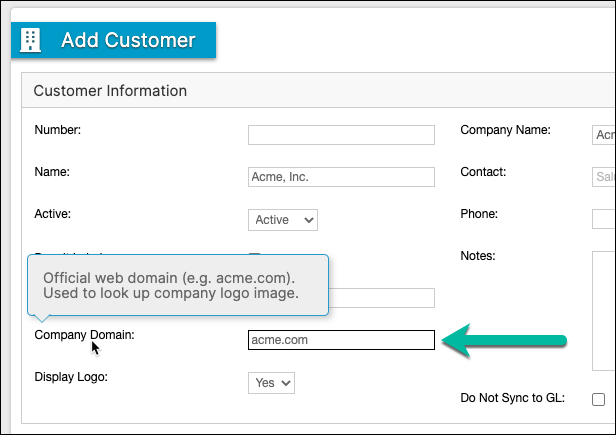
The entire Clearbit integration hinges on the Domain field on the Customer object. In order for Maxio Platform to pull in rich Clearbit company-level data for your Customers, a valid Domain (website) is required. Simply enter the Domain value when creating or editing Customer records.
Domain may be entered or managed in the following ways:
- Manually enter on the Add Customer or Update Customer pages.
- Customer Bulk Edit. To learn more, see Use Bulk Edit to Update Multiple Records.
- CRM Sales Order Mapping or Account (Customer) Metadata Mapping.
- Import Utility.
- API (read and update). See the API documentation (Admin menu->API Documentation) for details.
Customer record
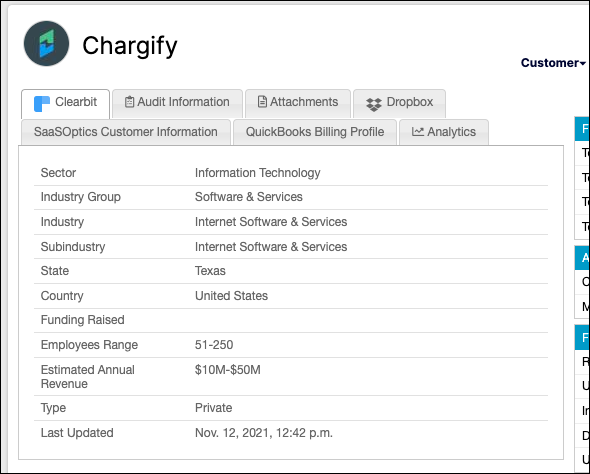
When you're viewing a Customer record with a valid Domain value, a Clearbit tab displays the Clearbit company attributes determined in your integration settings.
Customer list
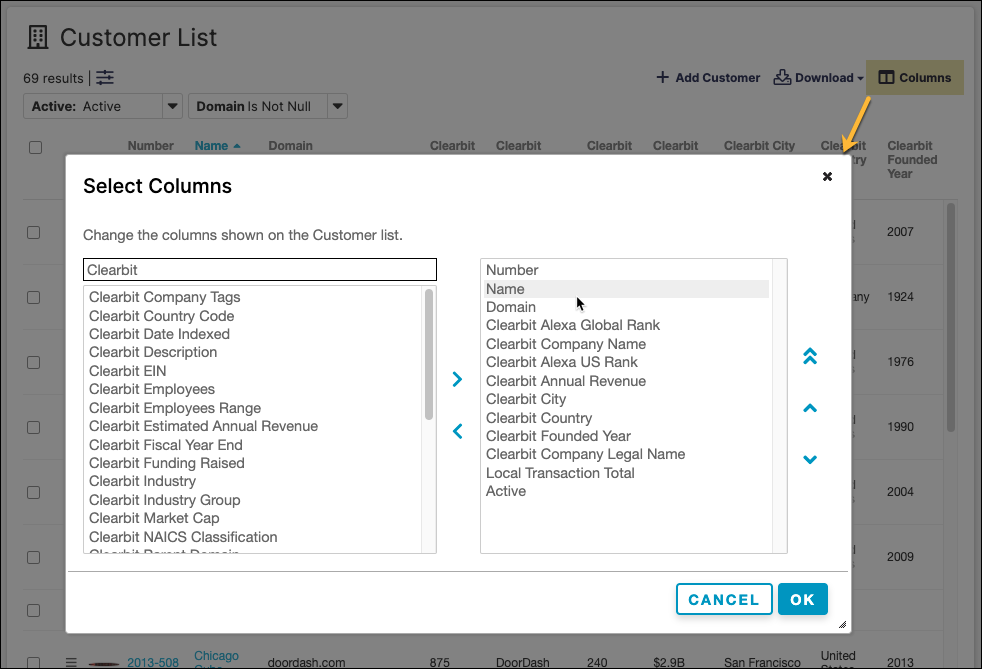
Clearbit values can also be displayed when you're viewing the Customer List. Click Columns to customize your Customer List view.
Click Select Filters to narrow the list down to the specific records you're searching for.
You can download or export all Clearbit company data from the Customer List.
Reporting
A huge benefit of the Clearbit company data in Maxio Platform is the ability to leverage the data through the lens of Maxio Platform reporting.
- All of the Clearbit Customer fields are available as filters in Analytics Reports.
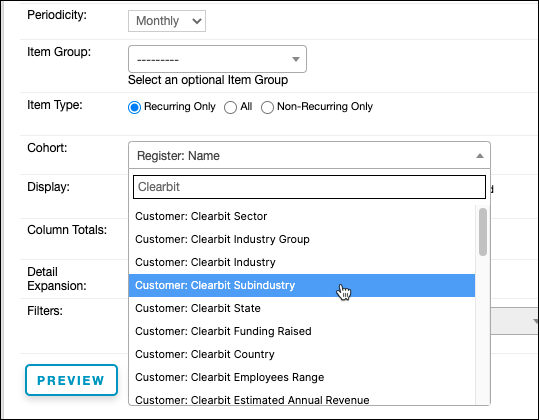
- All of the Clearbit Customer fields are available as Cohorts in the Analyzing Customers Using the Cohort Report.

Integration behavior
When a customer record is created with a Domain value, or when a customer record is modified and the Domain value changes, Maxio Platform makes an API call to Clearbit to fetch the data connected to that Domain value. When one of those events occurs, the Last Updated field on the Clearbit tab is populated.
Maxio Platform performs a nightly sync with Clearbit to keep company data current. To avoid re-fetching from Clearbit too frequently, Maxio Platform only re-syncs a Customer's Clearbit data once it's more than 7 days old.
Clearbit data cannot be sent or synced to third-party applications (e.g. Salesforce, HubSpot, Pipedrive).
Clearbit company logos
When you're viewing a Customer record with a valid Domain value, Maxio Platform displays your customer's company logo. If a domain/website doesn't provide Clearbit with a logo image, Maxio Platform displays a grayscale image with the first letter of the company name instead. You can disable the logo on an individual Customer record by changing the Display Logo setting to No.
Customer logos also appear on the Customer List. You can disable the logo feature entirely from the Clearbit integration's settings page (Admin->Clearbit).
Still need help?
Reach out and our support team will take it from here.