
Understand Billing Portal Login Flow
Last updated on Aug 28, 2026
Invite Customers to the Billing Portal manually, or automatically upon Subscription creation. Visit the Settings tab in Advanced Billing and click Billing Portal to see the available options.
Ways to log in to the Billing Portal
The Billing Portal doesn't require the Customer to set or remember a password. Instead, everything they need to sign in is included in one of these emails:
- Invitation email
- Login link
- Management URL
That said, a Customer can always log in using their email address and password if password logins are enabled. See Understand Billing Portal Authentication for the different ways to gain access to the portal.
Once logged into the Billing Portal, a Customer can access their Billing Portal account directly via their management URL from the same device they originally logged in from. Old management links become invalid after the configured expiration period (65 days, by default).
A Customer's session may be invalidated after a period of inactivity. If a Customer wants to access their Billing Portal account from a different device, they need to request a new login link by email and click it from the new device.
Login flow when email verification is required
If a Customer hasn't verified their email, they can't access the Billing Portal.
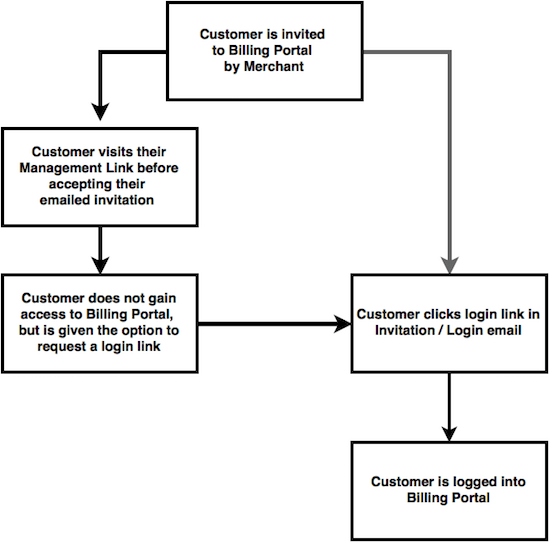
When email verification is required, the management URL can't be used until the Customer accesses their invitation email or a login link.
Login flow when email verification is not required
When email verification isn't required, Customers reach the Billing Portal more directly.
A Customer can visit the management link from their email and access the Billing Portal immediately. Alternately, they can click the login link in the invitation to log in immediately.
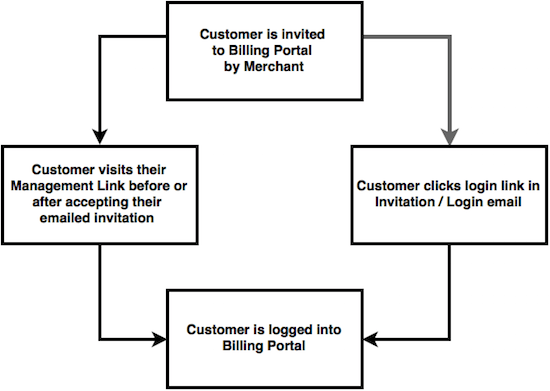
With email verification off, accepting an invitation isn't necessary.
Related information
See Understand the Billing Portal for an overview of what the Billing Portal does and who it's for.
See Understand Billing Portal Invitations for how to configure automatic and manual invitations.
See Explore Billing Portal Topics for the full set of Billing Portal setup, access, and support articles.
Still need help?
Reach out and our support team will take it from here.