
Understand Metered Fields for Invoices
Last updated on Aug 28, 2026
BETA
This feature is currently in beta and may change over time. During the beta period, functionality, availability, and performance may vary.
To join the Beta program, request Beta access.
Add Metered Fields to Advanced Billing invoices to show usage data from Maxio Metering without changing invoice charges. Use Metered Fields to display aggregated meter usage, segmented usage, and formula-based usage values for specific Subscriptions and billing periods.
Important: Metered Fields are display-only. They do not generate charges. They are a transparency and reporting tool that lets your customers see the usage data that underpins their bill.
What Metered Fields show
Invoices in Advanced Billing show line items for charges: Products, one-time fees, and discounts. For customers with usage-based pricing, that list of charges often doesn't tell the full story. How many API calls did a subscriber make? What was their peak storage? How did individual usage dimensions break down over the billing period?
Metered Fields fill that gap. Each Metered Field is a named usage section that appears on the Invoice, pulling aggregated data directly from your Maxio Metering Meters. You define Metered Fields once at the site level, then activate them individually on each Subscription where they should appear.
Requirements
Before creating Metered Fields, confirm the following are in place:
- Maxio Metering is enabled on your site.
- At least one Meter is defined on your site.
- The Metered Fields feature is enabled on your site. Contact Maxio Support to request access during Early Access.
Metered Fields that use Advanced Formula expressions (combining multiple Meters) additionally require the meter_formula feature to be enabled. See Use Advanced Formulas with Metered Fields.
Key concepts
| Term | Definition |
|---|---|
| Metered Field | A named usage section on an Invoice. Configured at the site level and activated per Subscription. Shows aggregated Meter data for the billing period; does not generate a charge. |
| Meter | A Maxio Metering Meter that provides the usage data displayed in the Metered Field. One Metered Field can reference one or more Meters. |
| Formula Meter | An optional advanced configuration that replaces direct Meter references with a mathematical expression combining multiple Meters (for example, [reads] + [writes]). Requires the meter_formula feature. |
| Billing Period Source | Controls which date range is used when querying Meter data for display. Can be the Subscription's billing period or a specific Product's billing period. |
| Metered Field Subscription | The per-Subscription activation of a Metered Field. Determines whether a Metered Field appears on that Subscription's invoices, and optionally scopes it to a specific Product. |
How Metered Fields appear on invoices
Metered Fields appear as a dedicated usage section on the Invoice, separate from billing line items. Each activated Metered Field renders as a named block showing:
- Section header: The Metered Field name (for example, API Usage)
- Date range: The billing period covered by the Meter data
- Usage table: One row per Meter (or one row for the formula result), showing the Meter name and its aggregated usage value for the period
- Segmented breakdown: If the Meter uses segmentation, usage is broken out per Segment within the table
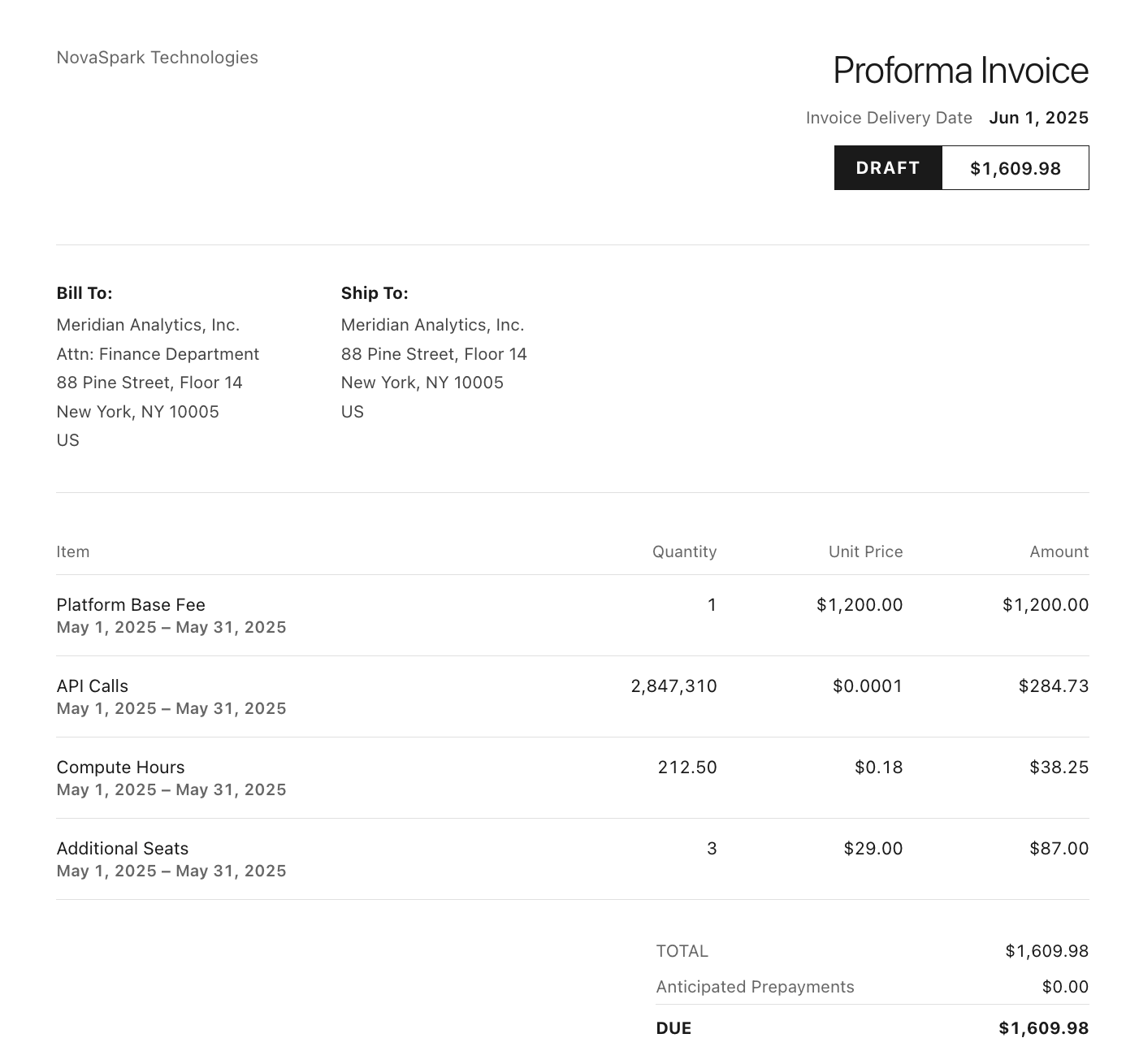
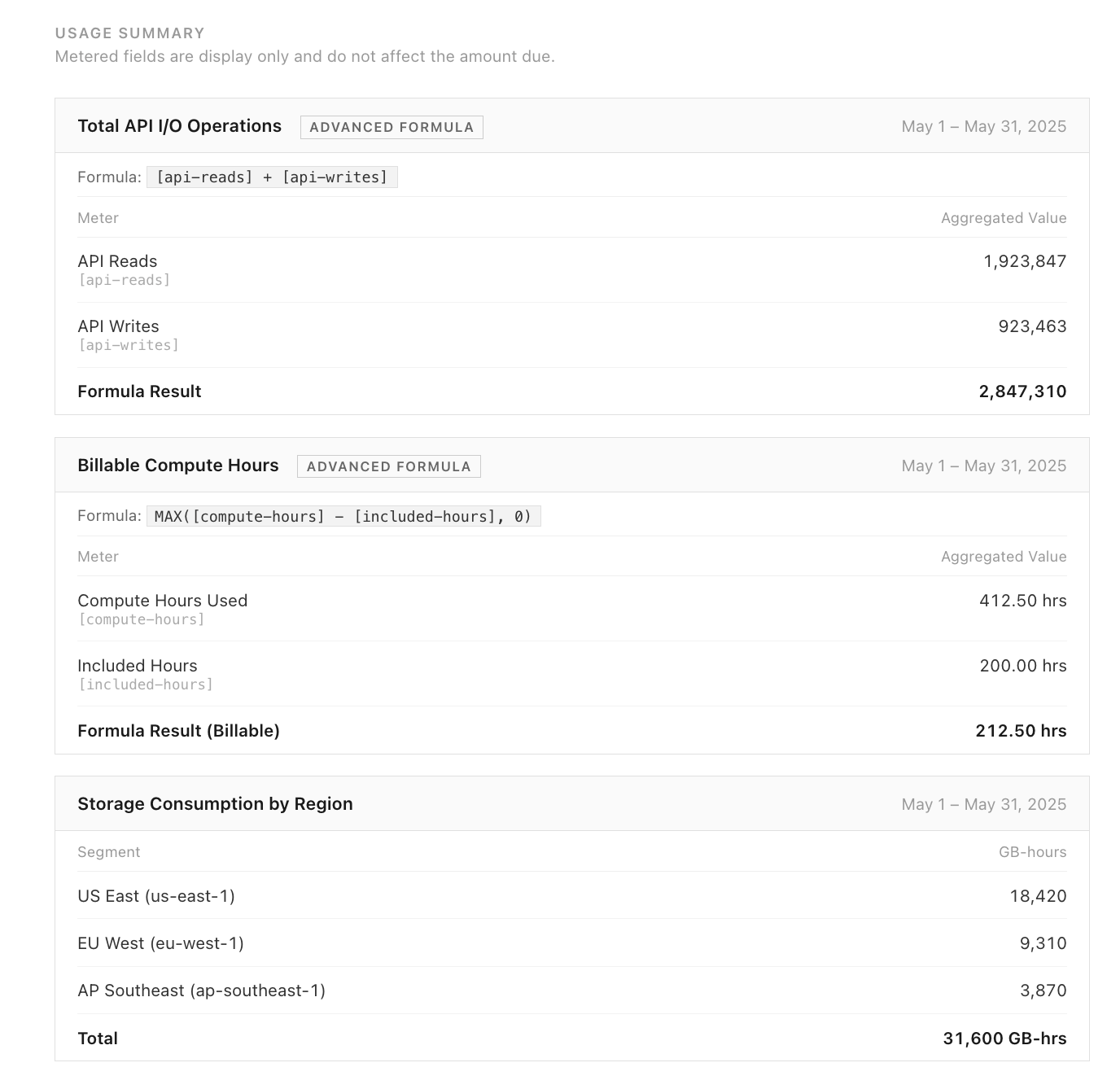
If Meter data is temporarily unavailable when an Invoice is generated, due to a query timeout or service interruption, the Metered Field section displays "temporarily unavailable" rather than failing the Invoice. The charge is not affected.
Metered Fields are display-only and do not affect the amount due on the Invoice.
By default, unbilled metered usage on an Invoice is labeled "Metered Usage (Not Billed)." You can customize this label under Config > Settings > Language Settings > Customize Language.
If your site is still on Metering v1 (legacy), the Metered Fields creation and activation flow differs from what this article describes. See Create Metered Fields for Invoices for details.
Limitations
- Metered Field names must be unique per site. You cannot create two Metered Fields with the same name on the same site.
- Meter references must share the same Stream. When adding multiple Meters to a Metered Field (or using a formula), all Meters must belong to the same Stream.
- Formula Meters require the
meter_formulafeature. You cannot use formula expressions in Metered Fields without this additional feature enabled. - Activation is per-Subscription. Creating a Metered Field at the site level does not automatically add it to any invoices. Each Subscription must be individually configured.
- Metered Fields do not appear on parent invoices in consolidated billing scenarios.
Related information
To create and activate a Metered Field, see Create Metered Fields for Invoices.
For answers to common questions, see Metered Fields FAQ.
For general Metering setup, see Understand Maxio Metering.
Still need help?
Reach out and our support team will take it from here.