
Scope Custom JavaScript to a Specific Page
Last updated on Aug 27, 2026
Use the following snippets to detect which type of hosted page your custom JavaScript is running on, so you can scope specific code to just that page instead of every page.
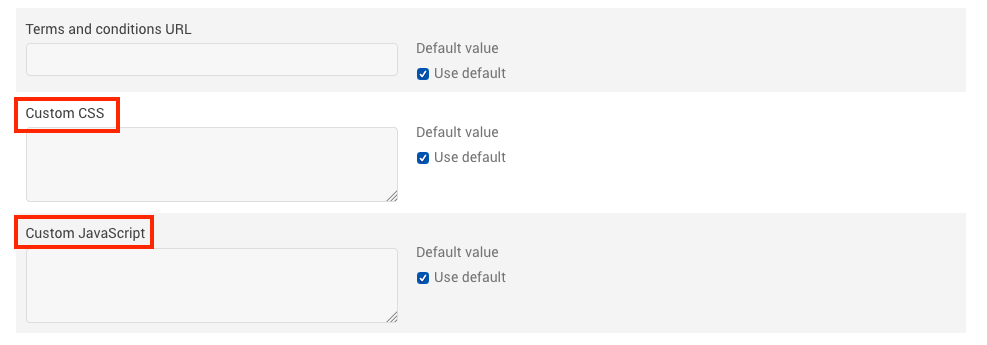
Add custom JavaScript under Config > Settings > Public Page Default Settings > Custom JavaScript.
These selectors are scoped to Public Signup, Receipt, and Self-Service Pages.
#self-service-pageis also present on the Bank Account Verification page, and.public-signup-pageis also present on the Bank Account Verification and Pay Invoice pages. If your site uses those page types too, add an additional check to exclude them.
Modern layout
Self-service page only
if ($('#self-service-page').length === 1) {
  // code here
}
Public signup page and receipt page only
if ($('.public-signup-page').length !== 0) {
  // code here
}
Receipt page only
if ($('.public-signup-page__success').length === 1) {
  // code here
}
Public signup page only
if ($('.public-signup-page__signup').length === 1) {
  // code here
}
Classic layout
Public signup page and receipt page only
if ($('#self-service-page').length === 0) {
  // code here
}
Receipt page only
if ($('#hosted-payment-history').length !== 0) {
  // code here
}
Public signup page and self-service page only
if ($('#hosted-payment-history').length === 0) {
  // code here
}
Receipt page and self-service page only
if ($('#total').length === 0) {
  // code here
}
Public signup page only
if ($('#total').length === 1) {
  // code here
}
Examples
You may want to change your submit button text to say "Subscribe" on all of your Public Signup Pages. Use the following JavaScript:
$('#subscription_submit').val('Subscribe');This also updates the submit button text on Self-Service Pages, since the same element ID appears on both. Wrap your code in the proper snippet from above to scope it to just the page you want.
Change button text on Public Signup Page only
// MODERN LAYOUT
if ($('.public-signup-page__signup').length === 1) {
  $('#subscription_submit').val('Subscribe');
}

// CLASSIC LAYOUT
if ($('#total').length === 1) {
  $('#subscription_submit').val('Subscribe');
}
Change button text on Self-Service Page only
if ($('#self-service-page').length === 1) {
  $('#subscription_submit').val('Update Info');
}
The Custom CSS and Custom JavaScript fields look the same whether you're editing the site-wide Public Page Default Settings or an individual Public Signup Page's own settings.
Related information
See Configuring Public Page Default Settings for adding this JavaScript site-wide instead of to a single page.
See Public Signup Page Settings Reference for overriding a default on one page.
Still need help?
Reach out and our support team will take it from here.