
Understand Reactivation and Resume Scenarios
Last updated on Aug 28, 2026
Reactivating or resuming a Subscription behaves differently depending on its attributes, such as an existing coupon, calendar billing, an outstanding balance, or whether its trial has ended.
Reactivation scenarios
Reactivating a Subscription has the following effects:
- The Subscription balance resets to $0.
- The Subscription is immediately activated.
- The Customer is charged the normal price for a single period.
- The Customer's billing date resets to today.
Subscriptions have several attributes that factor into reactivation, including:
- Current balance due
- Current Subscription credit
- Existing coupon code
- Existing Products
- Calendar billing
The following scenarios walk through how reactivation behaves in the presence of each attribute.
Reactivate with a coupon
When a Subscription is Canceled, you can add a coupon so the Subscription is discounted upon reactivation. This is a useful tactic for bringing subscribers back after canceling.
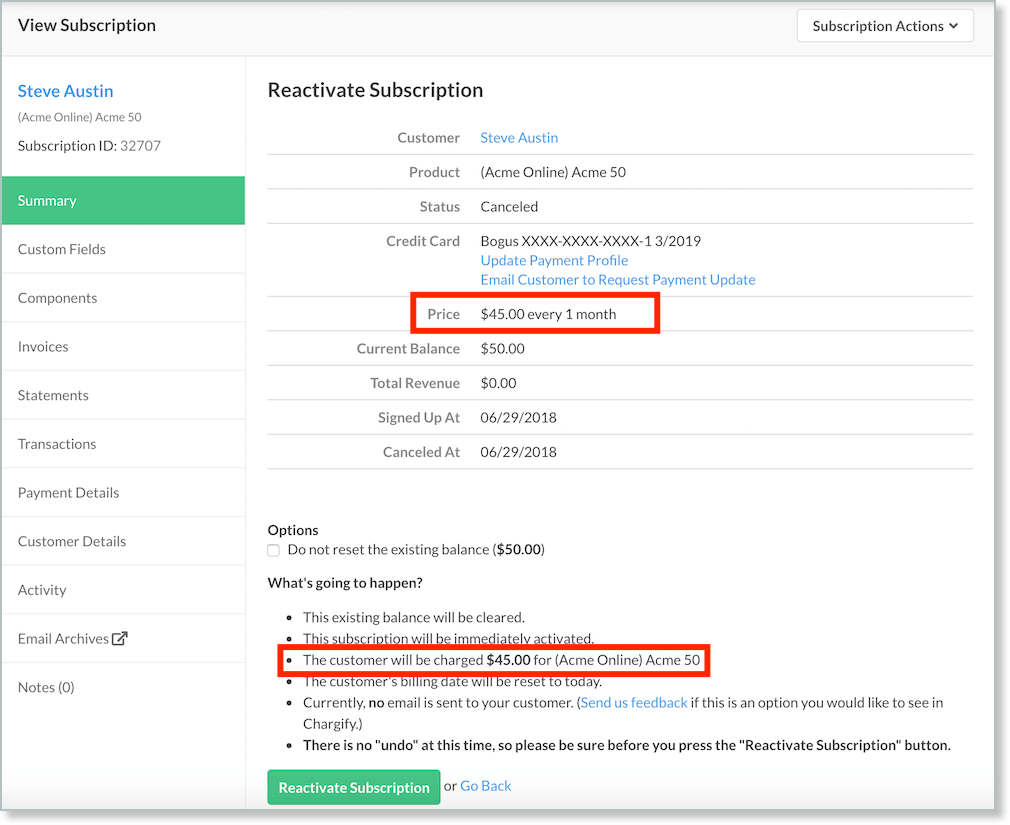
In the example below, the coupon 10 PERCENT OFF COUPON is applied for a 10% discount prior to reactivation. The Gold Plan has a recurring cost of $50.00 per month, with a resulting cost of $45/month after the discount.
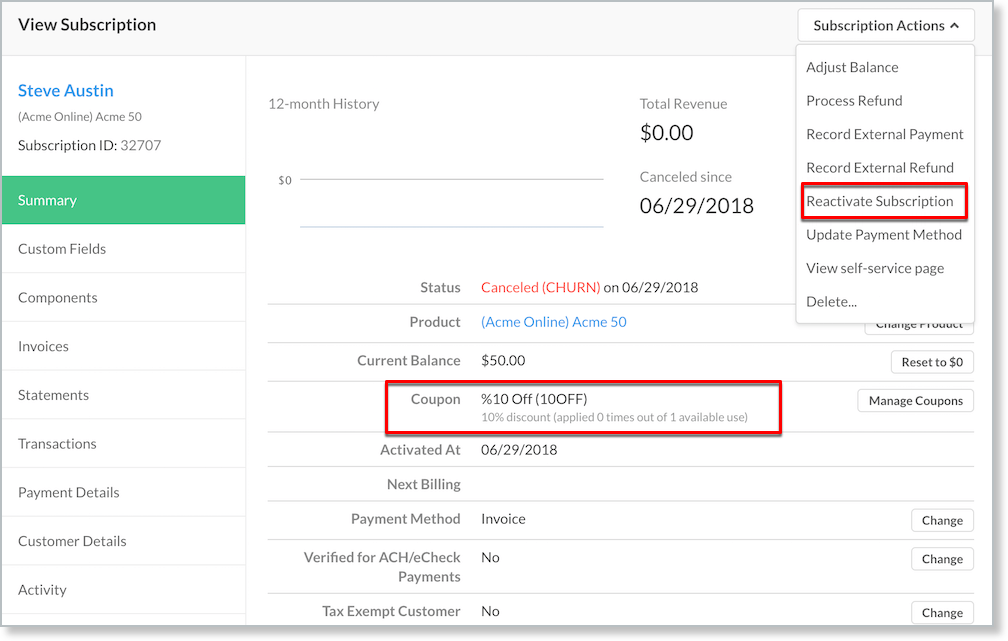
After the coupon is applied to the Subscription, select Actions > Reactivate Subscription to preview the costs and actions to be applied to the Subscription.
Reactivate a calendar billing Subscription
Reactivation under calendar billing has a few unique traits worth outlining.
- A Subscription that signs up via calendar billing inherits an attribute called the snap date.
- The snap date is the date the Subscription automatically charges your subscriber.
- The snap date doesn't change when a Subscription is reactivated.
For example, a Subscription is created via a Public Signup Page, obtains a snap day of the 1st of the month, and cancels 6 months later on the 15th of the month. The subscriber wishes to reactivate on the 10th of the month; the snap day doesn't change.
When a subscriber is reactivated, you can control how the reactivation charge is handled:
| Calendar billing scenario | Amount charged upon reactivation |
|---|---|
| Prorated | Prorated Plan cost, relative to the next snap day |
| Immediate | Full Plan cost |
| Delayed | Full Plan cost at renewal (not reactivation) |
For example, a Subscription with a snap day of the 15th of the month, reactivated on the 10th, has its next billing on the 15th. You can choose to charge the prorated Plan cost at reactivation (from the 10th to the 15th), immediately charge the full Plan cost, or delay charging the full Plan cost until the 15th.
Reactivate a Subscription without payment
To reactivate a Subscription without charging the subscriber immediately, add credit by decreasing the Subscription's balance. If the Subscription has a negative balance, this credit is applied when the reactivation step is performed. See Subscription Actions Overview for complete information on adjusting a balance.
For the subscriber to be charged $0.00, the balance adjustment must be equal to or greater than the cost of the Plan. If the balance adjustment is less than the cost of the Plan, the subscriber is immediately charged the difference upon reactivation.
Example: If you're reactivating a Customer on a Plan that costs $100, set the Subscription balance to exactly -$100.00.
Important: When you reactivate the Subscription, you must check the Do not reset the existing balance box. This preserves the balance adjustment and doesn't charge the card on file during reactivation.
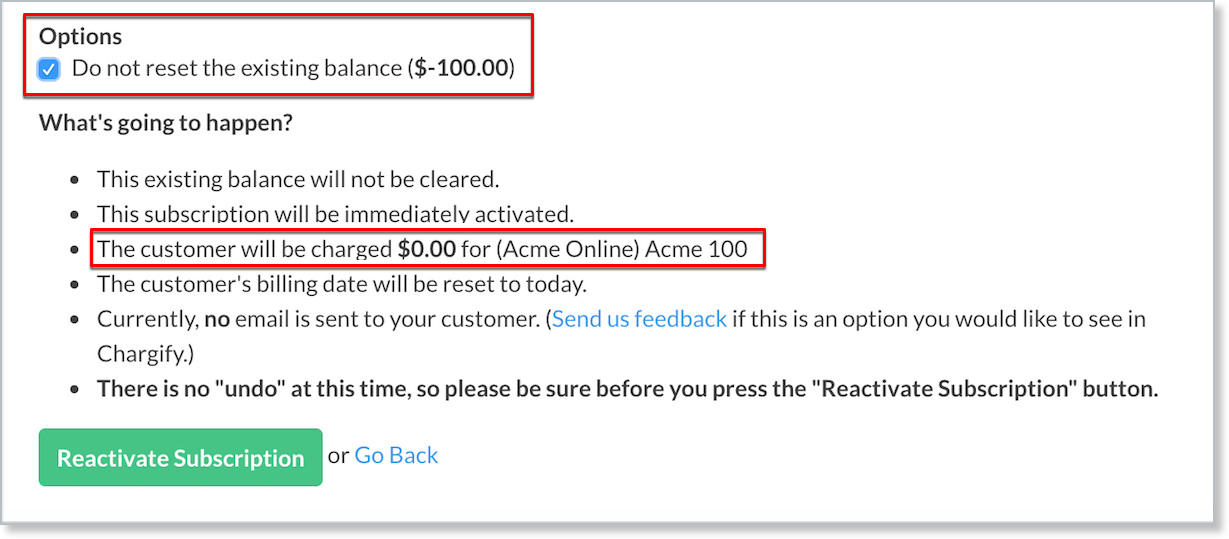
When you reactivate a Subscription, you receive a preview of the charges to be assessed. Confirm that amount is $0.00 if your goal is to reactivate without charging the card on file. Once these steps are complete, the card on file is charged at the next renewal date.
Reactivate a Trial Ended Subscription
Once a Subscription reaches the Trial Ended status, you can reactivate it by choosing Reactivate from the Actions menu.
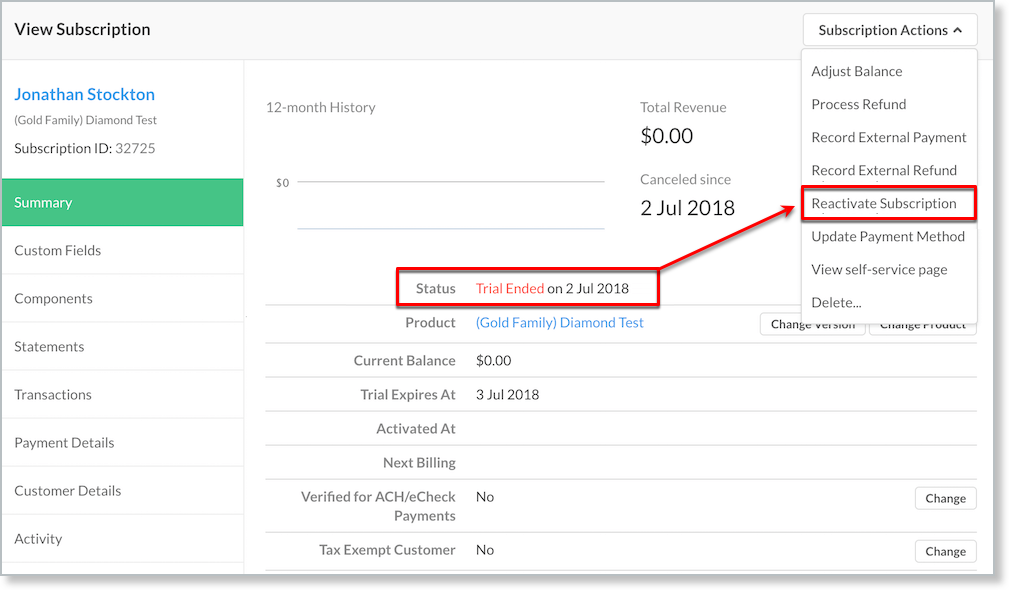
You can choose the default option of activating the subscriber on the same Plan without including the trial. If you don't include the trial:
- The existing balance is cleared.
- The Subscription is immediately activated.
- The Customer is charged the full Plan's recurring period cost.
- The Customer's billing date resets to today.
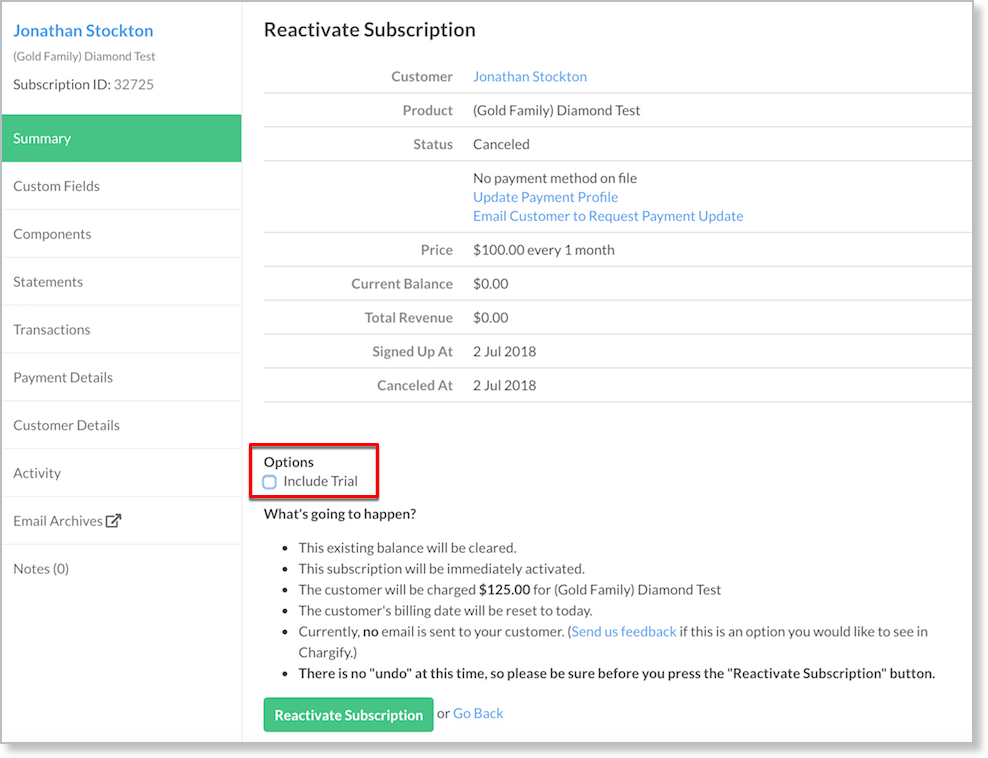
If you do include the trial:
- The existing balance is cleared.
- The Subscription begins the trial immediately.
Reactivate Evergreen vs. Term Subscriptions
When you reactivate an Evergreen Subscription, you can resume the current billing period or start a new one.
For Term Subscriptions, you can only resume the current billing period; you can't start a new one.
Reactivate a Subscription Group
If any Subscription in the group is a Term Subscription, you can only reactivate that Term Subscription. See Understand Subscription Groups with Multifrequency and Term Subscriptions for more.
Resume scenarios
Resuming restarts a previously Canceled Subscription within the billing period in which it was canceled, as though the cancellation never happened. Resuming a Subscription has the following effects:
- The Subscription is immediately activated.
- The Customer is charged any outstanding balance (you can optionally choose to forgive this balance before resuming).
- The Customer's billing date doesn't change.
A Subscription is "resumable" only if you're reactivating within the billing period it was canceled in. A resumed Subscription's billing date remains the same as before it was canceled; it doesn't start a new billing period. Whether payment is collected for a resumed Subscription depends on whether the Subscription had a balance when it was canceled (for example, if it was canceled due to dunning).
For example, a Subscription created on June 1, set to renew on July 1, is canceled on June 15. You can resume the Subscription on or before July 1; you can't resume it after July 1.
Resume a Subscription with a balance
If the Subscription has a balance, Advanced Billing attempts to collect it by default. You're given the option to forgive that balance before resuming.
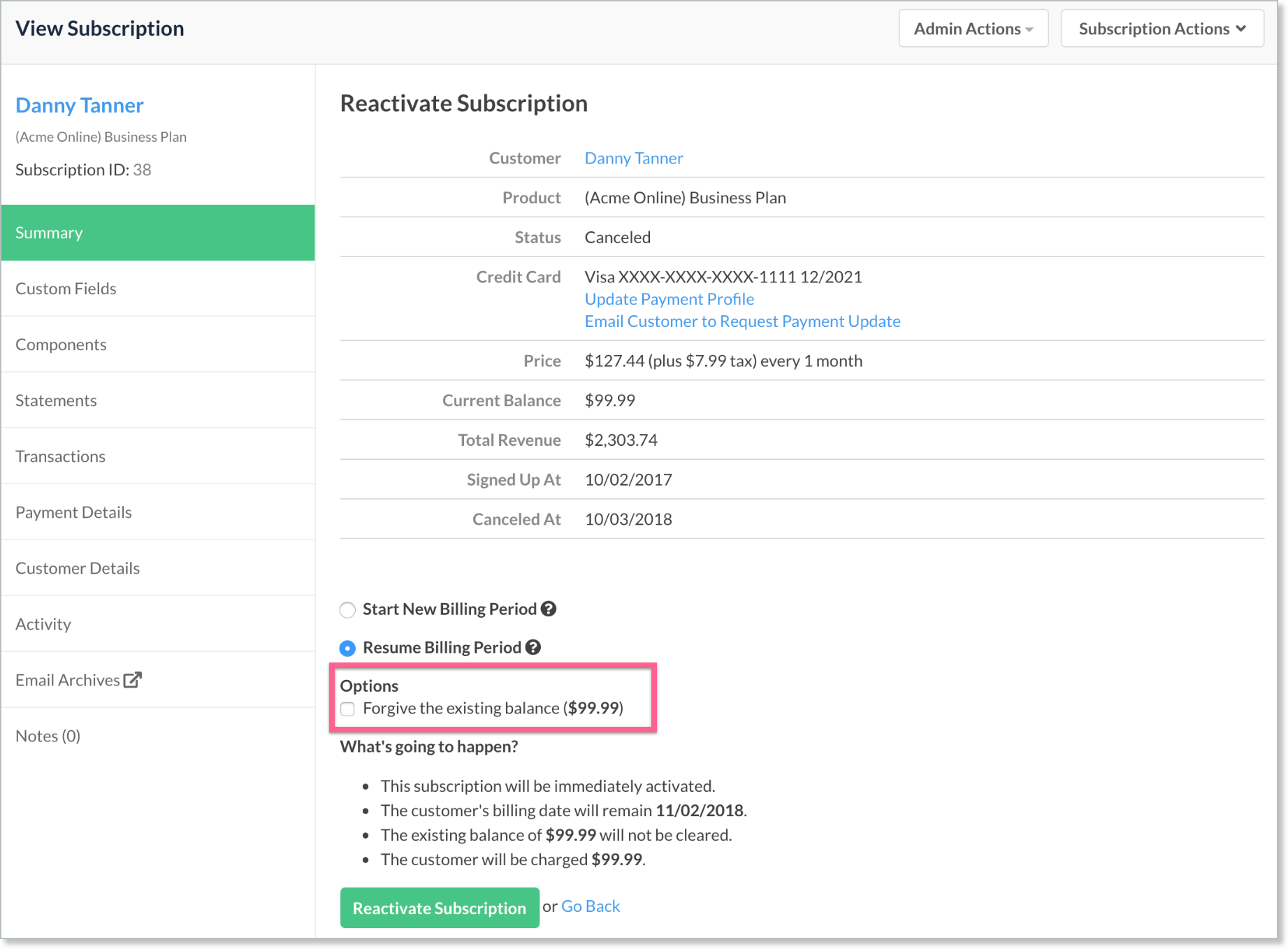
If you don't forgive the balance, Advanced Billing attempts to collect it; once the Subscription is successfully resumed, it's Active with no balance. If you do forgive the balance, Advanced Billing doesn't attempt to collect it; the balance is cleared, and the Subscription is resumed as Active with no balance.
Resume a Trial Ended Subscription
A Trial Ended Subscription isn't eligible to resume. It must be reactivated with a new billing period.
Related information
For the reactivate and resume procedures, see Reactivate or Resume a Subscription.
Still need help?
Reach out and our support team will take it from here.