
Clear a Pending Cancellation
Last updated on Aug 27, 2026
Pending Cancellation is a scheduled cancellation on an Active Subscription. The Subscription remains Active, displaying as Active (Pending Cancellation), until the scheduled date arrives, at which point it transitions to Canceled. Use it when the decision to cancel has already been made, but you want to guarantee uninterrupted service until a predetermined end date instead of canceling immediately.
Clear a Pending Cancellation
You can remove a scheduled cancellation before it takes effect.
To clear a Pending Cancellation
- Navigate to the Subscription's own page.
- Locate the Pending Cancellation line item.
- Select Clear Pending Cancellation.
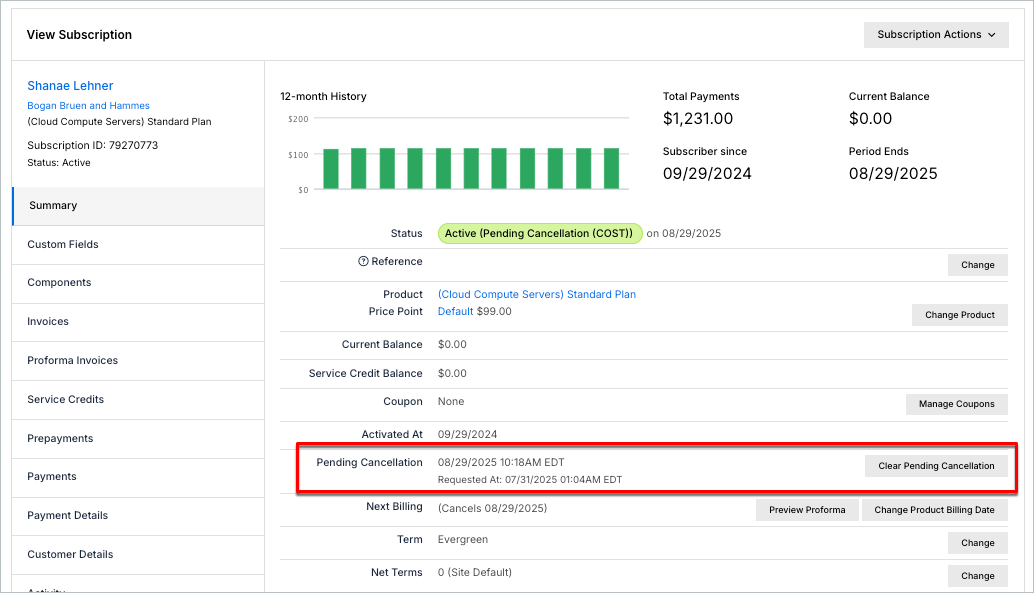
The Subscription returns to plain Active status.
What happens while a cancellation is pending
While a Subscription is Pending Cancellation, the Customer remains responsible for Product usage until the Subscription is actually Canceled. At the end of the period, Advanced Billing issues one Invoice covering everything accrued during that period, including Quantity-Based and On/Off Product charges and any Metered Product usage, and attempts payment collection. Only after that assessment completes does the Subscription transition to Canceled.
Related information
For the different ways to initiate a cancellation, see Cancel a Subscription.
Still need help?
Reach out and our support team will take it from here.