
Understand Customer Roles in Subscription Group Syncing
Last updated on Aug 27, 2026
When a Subscription Group syncs to Maxio, each Customer's role in the group, whether they're the Payer, a Subscriber, or both, determines which records actually sync and where they land. Understanding these roles helps you predict what to expect in Maxio once a Subscription Group syncs.
Single-customer subscription groups
When a Subscription Group consists of Subscriptions that all belong to the same Advanced Billing Customer, and that Customer is also responsible for payment (meaning the Payer is the primary Subscriber), this setup automatically syncs with Maxio. This behavior is not optional. Invoices, Payments, Credit Notes, and Refunds with Credit Note are all synced to Maxio in this case. Although Advanced Billing generates segment-level invoice data for Subscription Groups, segment behavior is minimal in single-customer groups, as all Subscriptions are tied to the same Customer.
Multi-customer and WhoPays users
Multi-customer Subscription Groups (where multiple Customers are included within the group) and WhoPays users (where the Subscriber and the Payer are different Customers) are handled differently. See Understand Customer Hierarchies and WhoPays for more information.
Syncing these Subscription Groups to Maxio is an optional Advanced Billing feature. If you're interested in enabling this multi-customer sync feature, contact the Maxio Customer Support team.
Once enabled, this feature syncs Invoices, Payments, Credit Notes, and Refunds for multi-customer and WhoPays Subscription Groups to Maxio, the same way single-customer groups already do. It also syncs any Parent you've defined in Advanced Billing to the Parent field in Maxio.
WARNING: Enabling this feature overwrites any existing Parent Customer links in Maxio for Advanced Billing Customers.
You modify and manage the Parent field only from Advanced Billing.
What to expect if this option is disabled
Without this optional feature, Invoices, Payments, Credit Notes, and Refunds associated with multi-customer Subscription Groups or WhoPays users don't automatically sync to Maxio. As a result, you may need to manually create equivalent records in Maxio to maintain alignment with your accounting records, and you may see reporting discrepancies between Advanced Billing and Maxio.
Parent-child subscription group workflow
For this example, you have a Subscription Group with the following:
- Grandparent 1 (the Payer)
- Parent 1 (the primary Subscriber)
- Child 1 (the secondary Subscriber associated with the Parent)
Example 1A: Customer and subscription mapping
The following diagram maps each Customer role in this example to its Subscription:
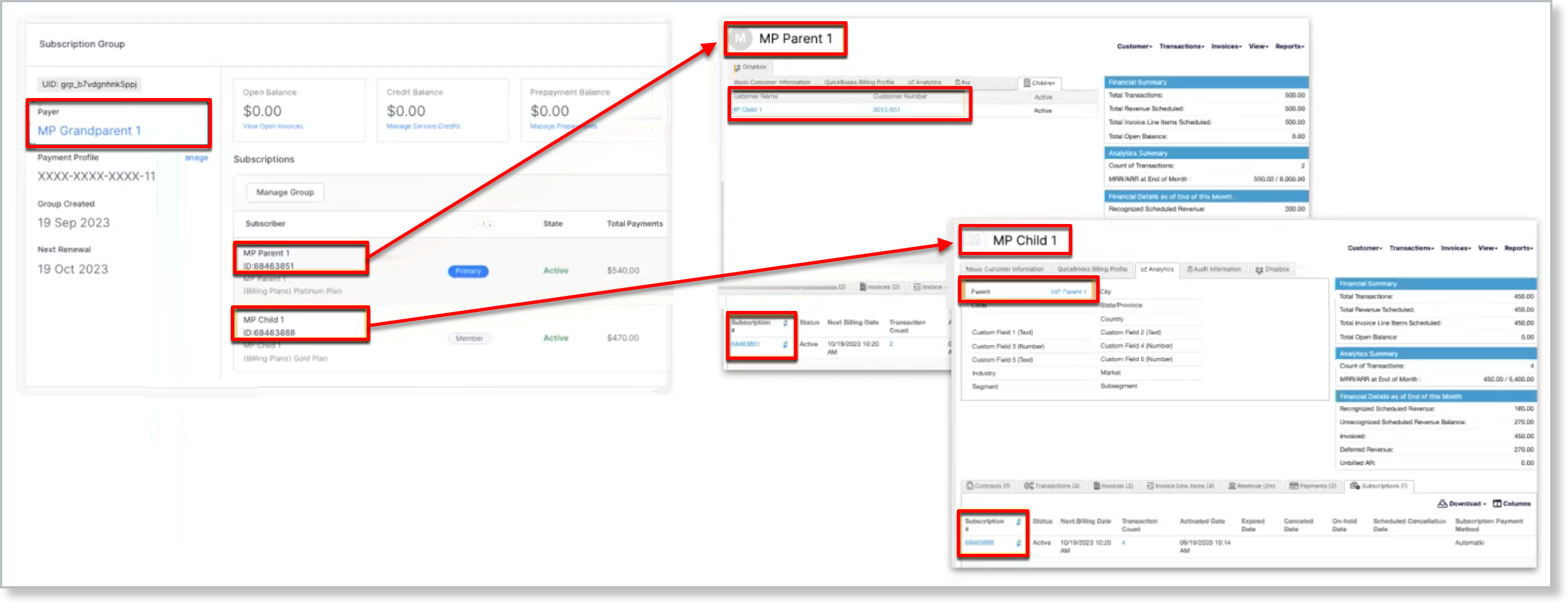
Because Grandparent 1 is the Parent of Parent 1 in Advanced Billing, enabling the multi-customer sync feature also creates a Customer record for Grandparent 1 in Maxio, following the Parent chain. However, this Customer doesn't have any associated Invoices, Payments, or Subscriptions unless directly referenced by a Subscription or an Invoice. Also, the Subscription that syncs is the Child Subscription, not the Subscription Group ID. As a result, there are two separate Subscriptions.
Example 1B: Invoice creation and syncing
Using the same Subscription Group as above, the segment from the Consolidated Invoice in Advanced Billing syncs over to Maxio, and an Invoice and Payment are created under the Parent (even though the Grandparent is the Payer).
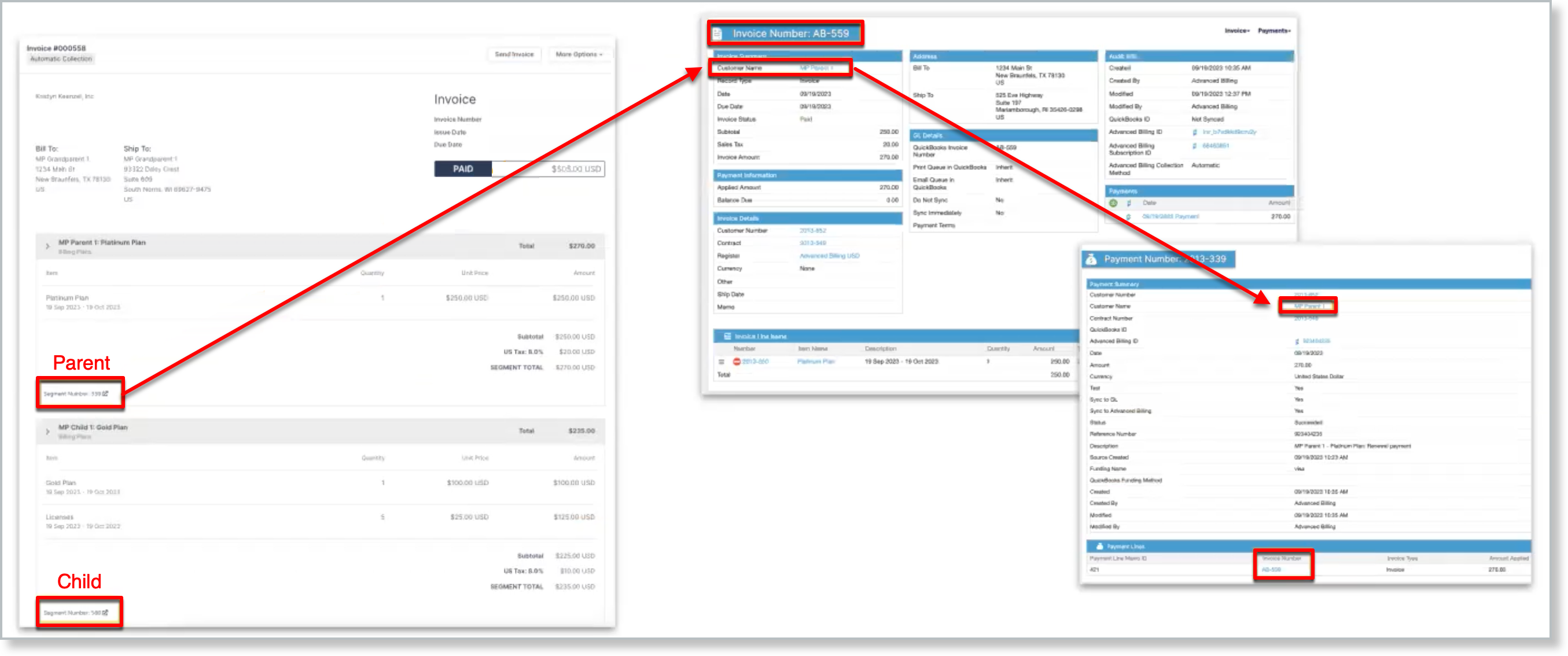
Likewise, the Child also has a separate Invoice and a separate Payment associated with it.
Example 1C: How subscription group payments are allocated
When a payment is processed for a Subscription Group, Advanced Billing allocates the total amount across the individual segments that make up the Consolidated Invoice. Each segment corresponds to a specific Subscriber, resulting in a separate Invoice and Payment record in Maxio.
In this scenario, the payment is handled as follows:
- The Payer submits the payment
Grandparent 1, who holds the payment profile, initiates the payment through the gateway. This Customer is designated as the Payer in Advanced Billing but does not have an associated Subscription or Invoice. Therefore, Grandparent 1 is not synced to Maxio. - Advanced Billing applies payment segments
The payment is split into segments based on the individual Subscribers within the Subscription Group. Each Subscriber's segment corresponds to their portion of the Consolidated Invoice. - Invoice and Payment records are synced
- Parent 1, as the primary Subscriber with a Subscription, receives a synced Invoice and a synced Payment in Maxio.
- Child 1, who also holds a Subscription, receives a separate synced Invoice and Payment as well.
- How the records are associated
In Maxio:- The Customer associated with each synced record is either Parent 1 or Child 1, based on their respective Subscription.
- Payments are linked to the Customer on each Invoice, not the entity who submitted the payment. Grandparent 1 is not reflected in any synced record because they do not have a Subscription or Invoice in Advanced Billing.
Related information
To learn more about Subscription Groups, see Understand Subscription Groups.
Still need help?
Reach out and our support team will take it from here.