
Manage Advanced Billing Users
Last updated on Sep 20, 2026
Who can see and change what in Advanced Billing comes down to three account levels and, for team members, a set of per-site access controls you assign yourself.
Keep your user records current
Stale user records are both a security risk and an operational one. If you're an owner or admin, confirm that the Owner on file is a current, appropriate decision-making contact with a valid email address, and remove or edit any dormant users.
WARNING: Only the owner can approve changes to the account on behalf of the business. If the person recorded as owner leaves your company and ownership isn't transferred first, nobody is authorized to make those decisions, and restoring that authority requires contacting Maxio Support.
Advanced Billing also keeps a separate internal customer record used for billing and account communication. That record is your main billing contact, not your decision-making authority, because billing correspondence often goes to accounting or a third party. To change either the owner or the billing contact, the current owner must contact support@maxio.com.
User access control
Fine-grained user access control lets owners and admins give each user a different set of access levels on each site, rather than one setting across the whole account.
Access levels
There are three levels of access for user accounts:
- Owner: The first user account on the seller account. Owners have administrative capabilities that can't be revoked. To transfer ownership, contact support@maxio.com.
- Admin: Any user may be made an admin by the owner or by the other admins.
- Team Member: A user on the account without admin privileges.
Team member access controls
User access control applies only to users with the team member status. Users with admin status will have access to all sites.
The access levels that can be assigned to team members are as follows:
- Read-only: the user can view limited information related to the site
- Setup: the user can manage the product catalog, settings, and integrations
- Financial: the user can view and export financial performance metrics
- Customer Support: the user can manage subscriptions and customers
Add users
You can add more user accounts (login and password) to your seller account if you are an admin or owner, so others can help you manage it.
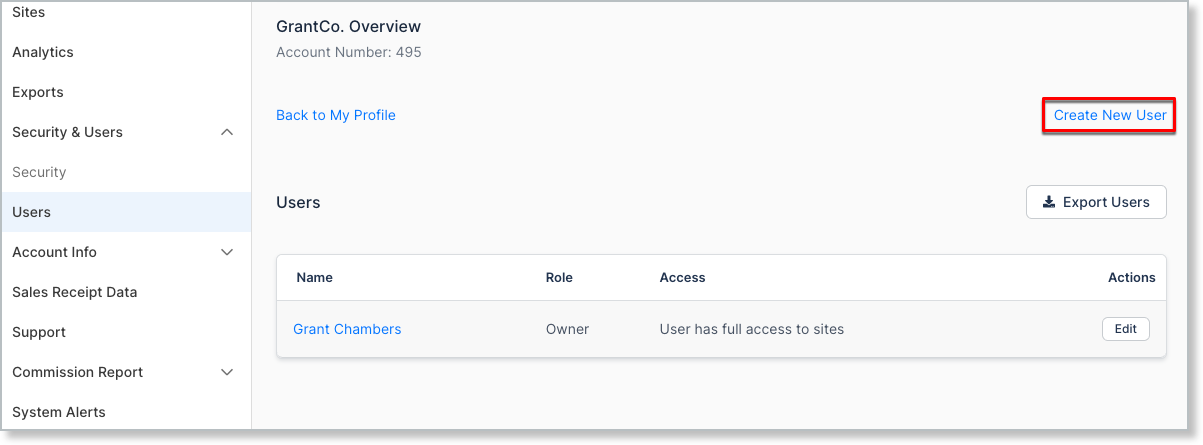
From your Seller homepage, navigate to the Users tab and click Create New User.
Unique user emails
Using an email that already exists anywhere in Advanced Billing returns the warning Email: must be unique - that value has been taken.
When adding a user to an Advanced Billing account, the user email may only be used once across all Advanced Billing accounts. If you have a situation where a person must be part of two Advanced Billing accounts, you must use a unique email for each user account.
User limits
How many team members you can add depends on your plan.
- All Advanced Billing Developer plans have a limit of 10 users on each account.
- All paid Advanced Billing plans have a limit of 1,000 users on each account.
Export Users
For easy access to user information, like user permissions, click Export Users.
A Downloads page appears. When ready, click the Download link to access the CSV export file.
The export contains one row per user per site, with the columns User Id, User Name, User Role, User Email, Site Id, Site Name, Setup, Financial, and Customer Support.
Team member settings
Team members can do everything an admin can, except for the account-level areas below. These restrictions apply regardless of which site access controls you grant.
- Site access - You control which sites each team member can reach.
- Sites - Team members can't clone, edit, or delete a site.
- Merchant info - No access.
- Security - No access.
- Users - No access.
- Billing and plans - No access.
Team member site access controls
Beyond those account-level restrictions, you control a team member's access site by site, so someone can have full access on a test site and none on your live one.
Most accounts combine access controls to fit a role. For example:
- Give an accountant permission to export financial performance and metrics.
- Give a customer support representative permission to manage subscriptions and customers.
- Give a developer permission to manage the product catalog and integrations on a test site only.
Each control appears as an icon against each site in the user's record.


Team member access reference
The tables below break down what each access level reaches, area by area.
In every table, X means the team member has no access to that feature, and ✔ means they do.
Dashboard
The dashboard is the landing page for the Advanced Billing application. From within the dashboard, team members may view a number of different metrics. Additionally, webhook data and financials are displayed.
The following table details access to the panes showing recent activity and metrics.
| Section | Read only | Manages catalog & settings | Views financials | Manages subscribers |
|---|---|---|---|---|
| Overview | Views only recent activity | Views recent activity and webhook status | View access | Views only recent activity |
| Monthly Revenue and Subscriber Count | X | X | View access | X |
| Daily Subscribers Added / Lost | X | X | View access | X |
| Recent activity | View | View | View access | View |
| Webhook status | X | View access | X | X |
| Signup performance | X | X | View access | X |
| Revenue performance | X | X | View access | X |
Dashboard financials
Embedded in the application, financial data is displayed. Use team member access controls to restrict access to these numbers:

| Section | Read only | Manages catalog & settings | Views financials | Manages subscribers |
|---|---|---|---|---|
| Total revenue | X | X | View access | X |
| Revenue today | X | X | View access | X |
| Subscribers | X | X | View access | X |
| Signups today | X | X | View access | X |
| Expired cards | X | X | View access | X |
| Pending renewals | X | X | View access | X |
Billing
The billing section is for subscription management. View your subscriptions, customers, transactions/payments, and invoices.
Subscriptions
Actions taken on a subscription record, from both the subscription list and the detail page.
| Section | Read only | Manages catalog & settings | Views financials | Manages subscribers |
|---|---|---|---|---|
| Delete payment profile | X | X | X | X |
Groups
Subscription groups are available on Relationship Invoicing.
| Section | Read only | Manages catalog & settings | Views financials | Manages subscribers |
|---|---|---|---|---|
| Group screen | View access | View access | View access | Access / Ability to edit |
| Manage group (add and remove) | X | X | X | Access / Ability to edit |
Catalog
The catalog section of the application depicts where you create and control pricing for your subscribers. Give careful consideration to whom can augment pricing on your live sites.
Products
Control what team members can access in your catalog of products, components and coupons. For more information on product and product families, see the Creating Plans help article.
| Section | Read only | Manages catalog & settings | Views financials | Manages subscribers |
|---|---|---|---|---|
| Creating product families | X | Access / Ability to edit | X | X |
| Editing product families | X | Access / Ability to edit | X | X |
| Archiving product families | X | Access / Ability to edit | X | X |
| Creating products | X | Access / Ability to edit | X | X |
| Editing products | X | Access / Ability to edit | X | X |
| Archiving products | X | Access / Ability to edit | X | X |
| Creating components | X | Access / Ability to edit | X | X |
| Editing components | X | Access / Ability to edit | X | X |
| Archiving components | X | Access / Ability to edit | X | X |
| Creating coupons | X | Access / Ability to edit | X | X |
| Editing coupons | X | Access / Ability to edit | X | X |
| Archiving coupons | X | Access / Ability to edit | X | X |
| Exporting products | X | X | Access | X |
Public Signup Pages
Decide what team members can access and edit your Public Signup Pages. See the Understand Public Pages help article.
| Section | Read only | Manages catalog & settings | Views financials | Manages subscribers |
|---|---|---|---|---|
| Create Public Signup Page | X | Access / Ability to edit | X | X |
| Update all layouts | X | No access | X | X |
| View | X | Access / Ability to edit | X | X |
| Edit | X | Access / Ability to edit | X | X |
| Disable | X | Access / Ability to edit | X | X |
Insights
Report access is granted per report, so a permission can open one report and not its neighbor.
| Section | Sub Section | Read only | Manages catalog & settings | Views financials | Manages subscribers |
|---|---|---|---|---|---|
| MRR | X | X | View access | X | |
| Revenue retention | X | X | View access | X | |
| Churn | X | X | View access | X | |
| Paid subscribers | X | X | View access | X | |
| Finance Report | X | X | View access | X | |
| Display usage / Hide usage | X | X | View access | X | |
| MRR exports | X | X | View access | X |
Tools
Advanced Billing’s tools section deals explicitly with email, webhook and site activity. See the Monitor and Resend Webhooks help article.
| Section | Sub Section | Read only | Manages catalog & settings | Views financials | Manages subscribers |
|---|---|---|---|---|---|
| Activity | View access | View access | View access | View access | |
| Email Insights | X | View access | X | X | |
| Webhooks panel | X | View access | X | X | |
| Resend webhooks | Access to resend webhooks | ||||
| Webhook testing | X | Access to send webhook tests | X | X |
Config
Config covers the settings that shape how your Site behaves, so access here reaches further than any other area.
Settings
Settings access should be limited to trusted team members. See the Understand Advanced Billing Site Settings help article.
| Section | Read only | Manages catalog & settings | Views financials | Manages subscribers |
|---|---|---|---|---|
| Gateway configurations | X | Access / ability to edit | X | X |
| Advanced Fraud Protection Settings | X | Access / ability to edit | X | X |
| ACH/eCheck | X | Access / ability to edit | X | X |
| Fields | X | Access / ability to edit | X | X |
| Webhooks | X | Access / ability to edit | X | X |
| Retries / dunning | X | Access / ability to edit | X | X |
| Retries / dunning ACH | X | Access / ability to edit | X | X |
| Churn reason codes | X | No access | X | ✔ |
| Public Page Default Settings | X | Access / ability to edit | X | X |
| Self Service Page URLs | X | Access / ability to edit | X | X |
| Billing Portal | X | Access / Ability to edit | X | X |
| Emails | X | Access / ability to edit | X | X |
| Status emails | X | Access / ability to edit | X | X |
| Statements | X | Access / ability to edit | X | X |
| Invoice billing | X | Access / ability to edit | X | X |
| Components | X | Access / ability to edit | X | X |
| CSV exports | X | Access / ability to edit | X | X |
| Multi-Currency | X | Access / ability to edit | X | X |
Integrations
Every integration is managed under Config > Integrations. Which integrations appear depends on the features enabled for your site.
Important: Embeddable Components, Xero, NetSuite, QuickBooks, Salesforce, and HubSpot are Owner and Admin only. The permission described as manages product catalog, settings, and integrations reaches every other integration on this page, but not these six.
| Section | Read only | Manages catalog & settings | Views financials | Manages subscribers |
|---|---|---|---|---|
| API Keys | X | ✔ | X | X |
| Embeddable Components | X | X | X | X |
| Maxio.js | X | ✔ | X | X |
| Mailchimp | X | ✔ | X | X |
| Twilio | X | ✔ | X | X |
| Xero | X | X | X | X |
| NetSuite | X | X | X | X |
| QuickBooks | X | X | X | X |
| Salesforce | X | X | X | X |
| HubSpot | X | X | X | X |
| Plaid | X | ✔ | X | X |
Referrals
Actions on the referral program and the history it records.
| Section | Read only | Manages catalog & settings | Views financials | Manages subscribers |
|---|---|---|---|---|
| View referral history | X | ✔ | X | X |
| View referrals overview | View access | View access | View access | View access |
| Modify coupon / credit settings | X | ✔ | X | X |
| Disable referrals | X | ✔ | X | X |
Custom taxes
Custom taxes are managed as part of the catalog, so the same permission governs every action below.
Custom tax actions by permission
| Section | Read only | Manages catalog & settings | Views financials | Manages subscribers |
|---|---|---|---|---|
| Create new tax | X | ✔ | X | X |
| Edit tax | X | ✔ | X | X |
| Delete taxes | X | ✔ | X | X |
| Enable | X | ✔ | X | X |
| Disable | X | ✔ | X | X |
Related information
For the Site-level settings these permissions govern access to, see Understand Advanced Billing Site Settings.
To review what a team member actually did, see Review Site Activity.
To give an integration programmatic access instead of a user account, see Advanced Billing API Keys.
Still need help?
Reach out and our support team will take it from here.