
Understand the Advanced Revenue Summary Report
Last updated on Sep 11, 2026
Use the Advanced Revenue Summary Report to see summary invoice, revenue, Deferred Revenue, long-term Deferred Revenue, and Unbilled AR totals, along with the summary and detailed journal entries you need to book revenue, liabilities, and assets related to your subscriptions. Drill down into any result for more detail.
NEW
You can now post this report's consolidated journal entries straight to your connected general ledger with Advanced Revenue Summary GL Sync, on demand or on a schedule, instead of booking them by hand. See Understand Advanced Revenue Summary GL Sync for what syncs and how it works, and Set Up Advanced Revenue Summary GL Sync to connect it.
Key features
The Advanced Revenue Summary Report includes the following capabilities.
Expand/collapse rows
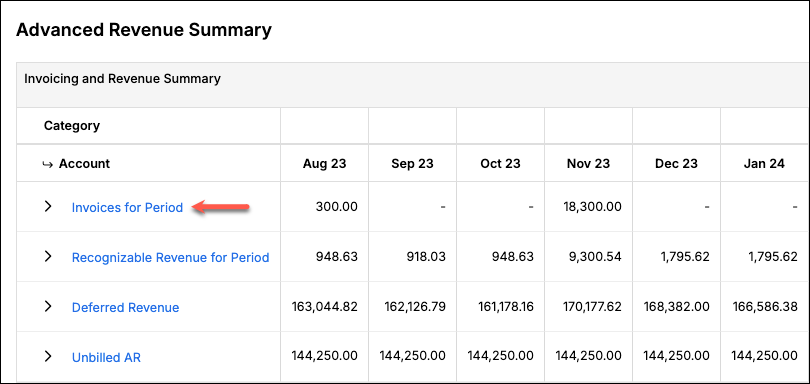
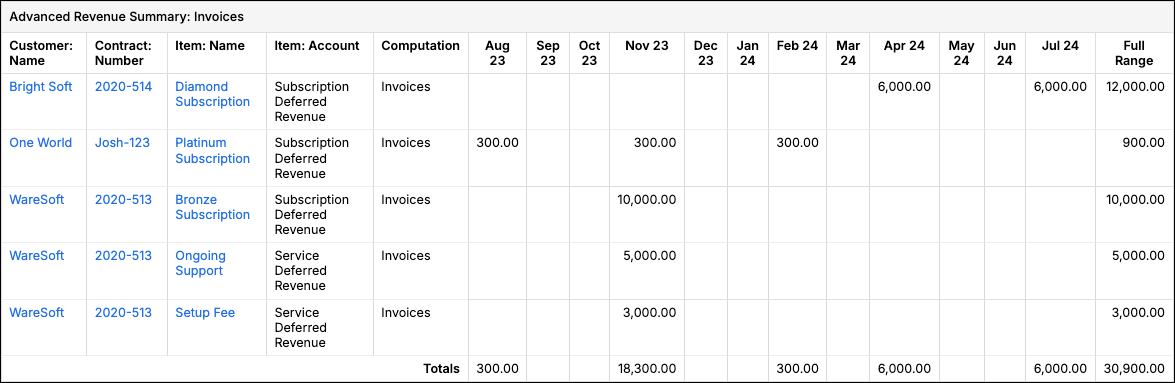
All invoicing and revenue summary rows can be expanded or collapsed to see additional detail broken out by account. Which account depends on the row: income account for revenue, liability account for Deferred Revenue, asset account for Unbilled AR, and the GL-linked account (or Liability account, if GL sync isn't connected) for Invoices for Period.
Drill down
Select a row header, an expanded account row, or a specific period to drill into additional detail. Drill-down is available for Invoices for Period, Recognizable Revenue for Period, Deferred Revenue, and Unbilled AR. When GL Sync is enabled for your account, Current Deferred Revenue and Long Term Deferred Revenue also support drill-down, in addition to the combined Total Deferred Revenue row.
Item mappings
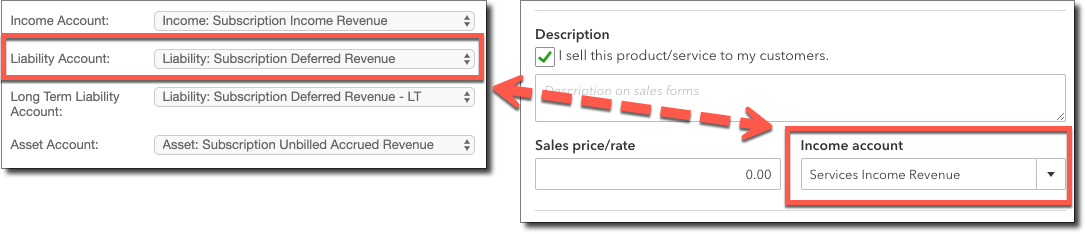
If your GL system is connected to Maxio Platform, Maxio Platform performs an additional check on your item settings, comparing your item mappings in Maxio Platform against your GL system's mappings. If there is a difference, a reclassification journal entry is triggered. The reclassification helps ensure you have the proper balance in your deferred revenue and revenue accounts at the end of each month.
This feature isn't available for Intacct or if you don't have a GL system connected.
Configure options
The Advanced Revenue Summary Report provides several options for configuring the report. For the full list of settings, see Configure the Advanced Revenue Summary Report.
Report results
Advanced Revenue Summary Report sections
| Section | Description |
|---|---|
| Invoices for Period | The sum of Invoice Line Items in the specified time period. |
| Recognizable Revenue for Period | The recognizable revenue across all relevant transactions for the defined period. This never includes revenue from Transactions with the Recognize checkbox unselected. |
| Unrecognizable Revenue for Period | The revenue across all relevant transactions for the defined period from Transactions with the Recognize checkbox unselected. Only appears when there's an amount to show. |
| Total Revenue for Period | The sum of Recognizable Revenue for Period and Unrecognizable Revenue for Period. Only appears when there's an amount to show. |
| Current Deferred Revenue | The portion of Deferred Revenue tied to your current liability accounts. Only appears when Display Short Term / Long Term Deferred Revenue is enabled. |
| Long Term Deferred Revenue | The portion of Deferred Revenue tied to your long-term liability accounts. Only appears when Display Short Term / Long Term Deferred Revenue is enabled. |
| Deferred Revenue | The sum of Deferred Revenue from Customers/Contracts with a positive Deferred Revenue balance. Labeled Total Deferred Revenue when Display Short Term / Long Term Deferred Revenue is enabled, since Current Deferred Revenue and Long Term Deferred Revenue break it out above. |
| Unbilled AR | The sum of Unbilled AR from Customers/Contracts with a positive Unbilled AR balance. |
| Cumulative Translation Adjustment (CTA) | A plug entry that reconciles foreign-currency translation differences between Deferred Revenue, Recognizable Revenue, and Invoices for Period. Only appears for multi-currency accounts with Enable CTA turned on. |
Journal entries
The report provides three journal entry sections:
To post the consolidated journals to your connected general ledger automatically instead of booking them by hand, see Set Up Advanced Revenue Summary GL Sync.
Still need help?
Reach out and our support team will take it from here.