
Clear Test Site Data
Last updated on Sep 19, 2026
Clearing site data wipes a test site back to a clean state, which is useful once a round of testing has left it full of throwaway subscriptions and customers.
WARNING: Clearing site data is permanent. The records you remove can't be recovered.
Before you start
The site must be in Test Mode, and you need the permission described as manages product catalog, settings, and integrations. If either isn't true, the option doesn't appear in the menu.
Active subscriptions don't block this option: clearing subscriptions along with customers and revenue is exactly what the second clearing option below is for.
Clear the data
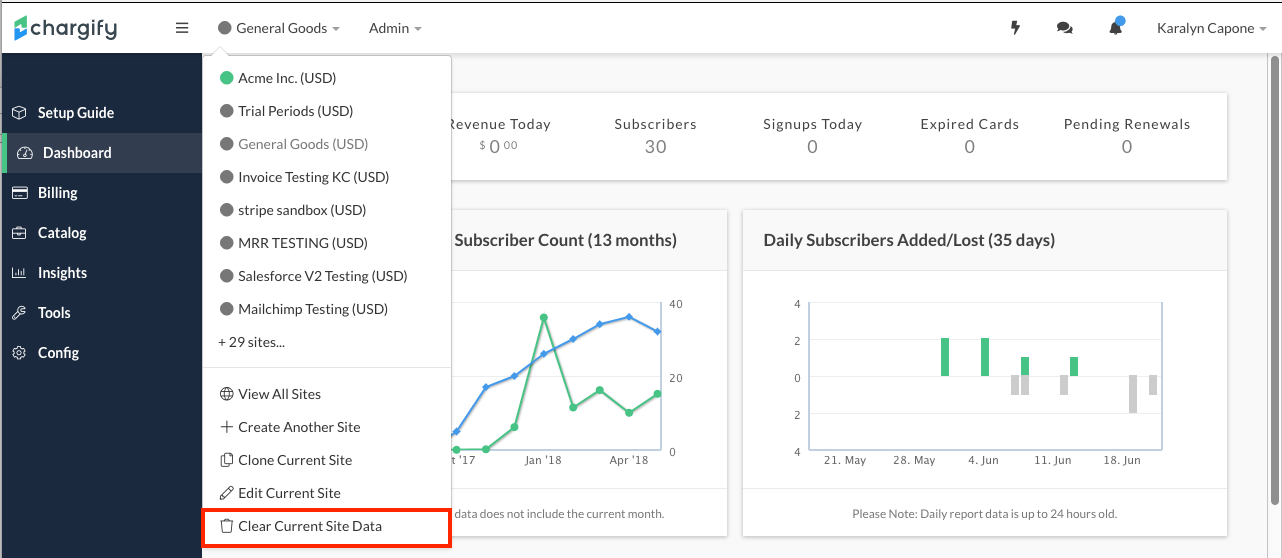
Clear Current Site Data lives in the site menu, and offers a choice between two levels of removal.
To clear site data
-
Select the site from the top menu bar.
-
Select Clear Current Site Data, then choose how much you want to remove:
- Clear all content (products, customers, subscriptions, and revenue)
- Clear only customers, subscriptions, and revenue (leaves your products in place)
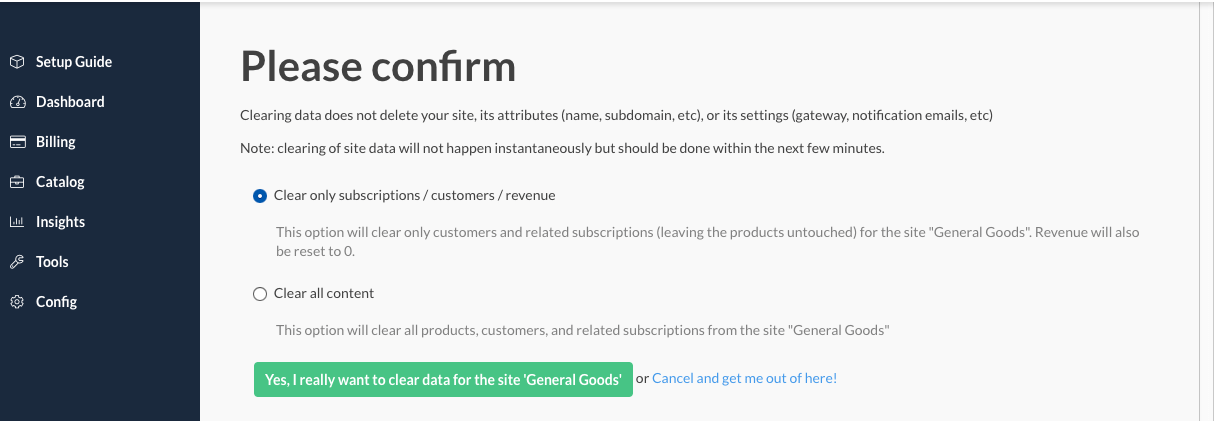
Choosing how much to clear
The second option is the one you usually want between test runs: your catalog took work to build, and keeping it means you can start testing again immediately instead of recreating products and price points.
Clear all content when the catalog itself is what you are changing, or when you want the site to look exactly as it did before any configuration at all.
Clearing data from a live site
To clear data from a live site, cancel all its active subscriptions first, then edit the site and return it to Test Mode. The requirement is deliberate: returning a site to Test Mode is a decision you have to make explicitly, so live customer data cannot be cleared by accident.
Related information
If you'd rather keep your test data intact and experiment separately, see the Create and Use Sandbox Sites help article.
Clearing site data is a step in going live; see the Enable Site Live Mode help article for the rest of that process.
Still need help?
Reach out and our support team will take it from here.