
Switch Organizations from Advanced Billing
Last updated on Sep 19, 2026
If you belong to more than one organization, you can return to the Org Picker from inside Advanced Billing and open a Site belonging to a different organization. You do this through the site switcher at the top of the left navigation pane, which is labeled with the Site you are currently in.
Return to the org picker
Switching takes you out of your current Site entirely, back to the screen where you choose which organization to work in.
To switch to another organization
- Open the site switcher at the top of the left navigation pane.
- Select View All Sites.
Maxio takes you out of your current Site to the organization-level view, where you can choose another organization and then a Site within it.
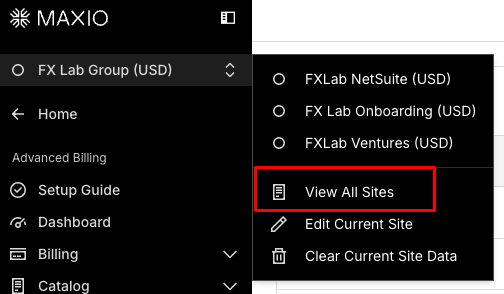
The switcher also lists the other Sites in your current organization directly, so switching within an organization does not require leaving it.
Related information
For the equivalent flow in Maxio Core, see Switch Organizations from Maxio Core.
Still need help?
Reach out and our support team will take it from here.