
Configure Field Requirements
Last updated on Sep 19, 2026
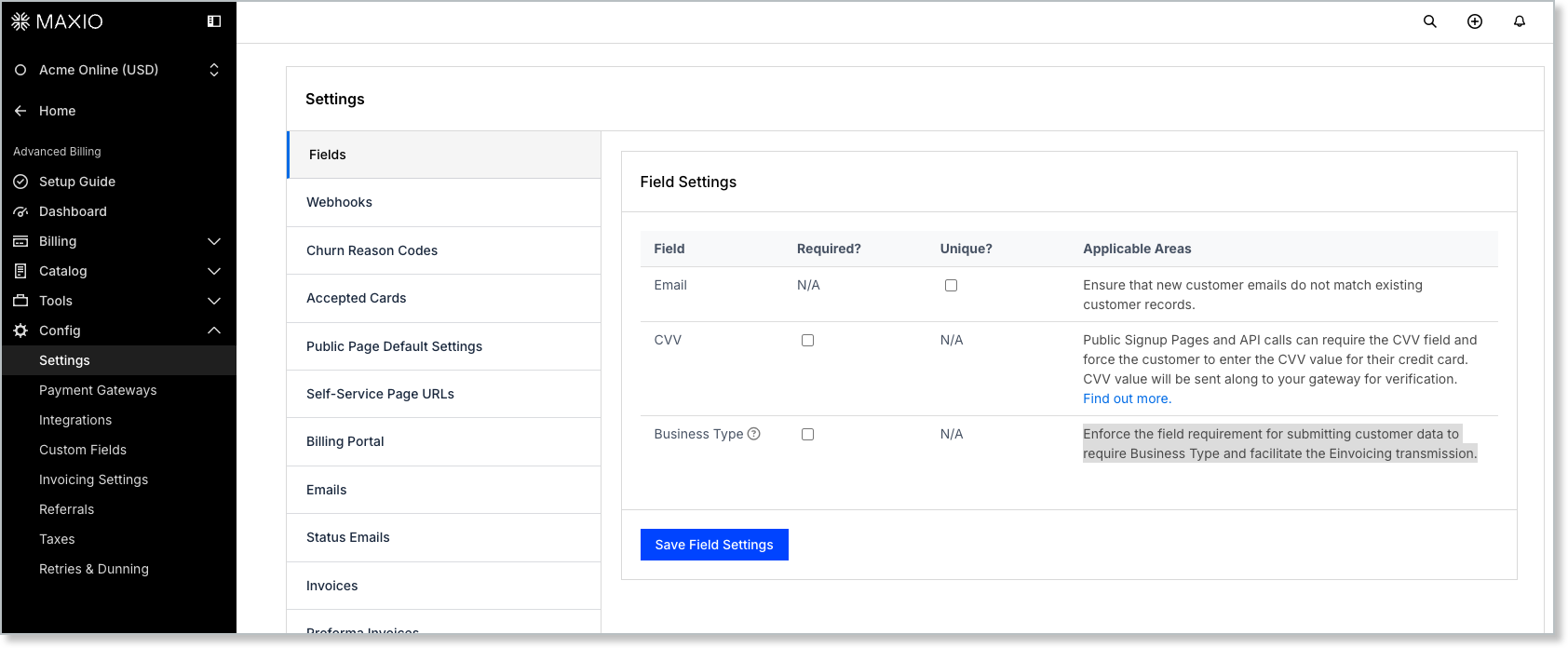
These settings control which fields your subscribers must complete, and which values Advanced Billing enforces as unique. Each field has a Required? or Unique? check box, or both. Go to Config > Settings > Fields, which requires the permission described as manages product catalog, settings, and integrations.
New Email
Marking New Email as unique ensures a new customer's email doesn't match an existing customer record.
The comparison is case insensitive, meaning that if a customer exists with an email address of mary@example.com, then Mary@Example.com counts as a duplicate.
A subscriber signing up through a Public Signup Page sees a message saying the email address is already in use. This block applies regardless of the state of any subscription already on that customer record.

Advanced Billing does not recommend deleting subscribers or customers from your site. However, if the need exists and the “Unique Email” setting is enabled, the only way to sign up an existing customer is to ensure their customer entry and subscriber entry are deleted.
Existing Email
Enabling Existing Email as unique ensures that an existing customer's email address cannot be changed to match another existing customer’s email address.
When this setting is enabled, if a user attempts to update an existing customer’s email to one that is already associated with another customer, the system prevents the change and displays an error message.
If this setting is disabled, users can modify an existing customer’s email to match another existing customer’s email, maintaining the system’s current behavior.
CVV Required
Marking CVV as required affects Public Signup Pages and API calls that add or update a card, forcing the customer to enter the CVV from their card. Advanced Billing sends that value on to your gateway for verification.
Advanced Billing does not store the CVV for any given credit card during signup. This information is sent directly to the gateway.
Where CVV is required
Marking CVV as required applies it to the following:
- Public signup page
- Public card update page
- Admin subscription creation page
- Admin card update page
- API subscription creation
- API subscription edit for card update
Business Type
Making the Business Type field required means that customers must include what kind of business they are in. Examples include B2B or B2C. This requirement helps maintain data accuracy and is essential for facilitating e-Bill transmission.
When this setting is enabled, any new or updated customer record must include a valid Business Type before submitting. If the field is blank, the system blocks the customer record from saving until it's supplied.
Related information
For the full list of settings available for your site, see the Understand Advanced Billing Site Settings help article.
Still need help?
Reach out and our support team will take it from here.